
8.1 If - else
You already came across If and Else nodes in the Setup sequence in the chapter Starting the Application. Look more closely at the details of the nodes.
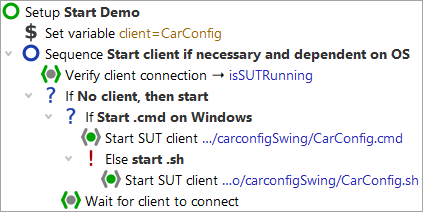
By means of an If node you can control whether certain nodes
will be executed or not. In this case, the decision is whether to start the SUT application.
First, determine whether the client is already running.
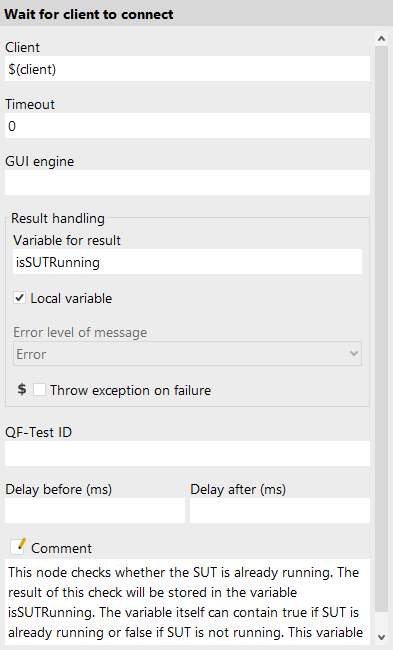
This is the job of the Wait for client to connect node, which writes the result
of its inquiry, either true or false, into a variable named
isSUTRunning.
The If node has a Condition attribute where you will find an
expression evaluating the result variable isSUTRunning. To refer
to its value use the syntax $() (see also note on variable syntax
in chapter "Procedure using a variable").
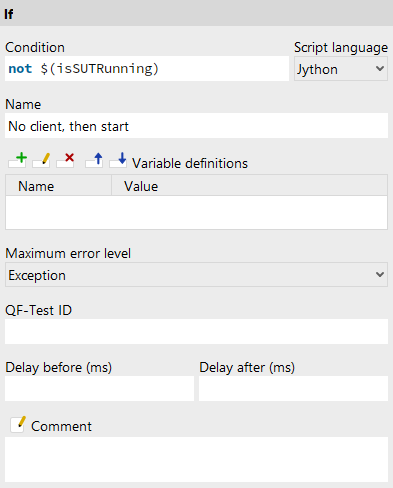
Depending on whether the client is already running or not QF-Test will execute the nodes nested in the If node.
- Action Stop the client in case it is running.
- Single-step through the Setup node.
- Leave the client running and single-step through the Setup node a second time.
If you like you can check the value of the variable isSUTRunning in the
variable bindings table. The first time it will have the value false
so that the condition not $(isSUTRunning) will become
true and the SUT will be started. The second time it will be true and the if-condition
will fail. The nodes nested in the If node will be skipped.
Within the first If node there is a second one checking the type of operating system - either Windows or a different one (Linux or Mac). This is where the Else node comes in, which will be entered if the condition test of the If node fails (in this case: the operating system is not Windows).
For checking the operating system you can directly resort to a QF-Test variable:
QF-Test stores the information about the operating system in a group variable
where the group is called 'qftest' and the variables 'linux', 'macos' or 'windows'.
The syntax for accessing group variables is ${group:varname},
e.g. ${qftest:windows}.