
29.4 Setting up a test suite
The base structure beneath the root node of a test suite is defined by the following nodes:
- An arbitrary number of Test set and Test case nodes to specify and structure functional tests.
- Procedures – reusable sequences organized into procedures.
- Extras – our playground for recordings, etc.
- Windows and components – the heart of the test suite. It contains all recorded windows and components of the SUT along with their properties.
Functional test cases are represented by Test case nodes and grouped or structured via Test set nodes.
Setup and Cleanup nodes can contain actions to ensure a well-defined state before and after a test case.
- Action We start by renaming the Test set node from "unnamed" to "Demo Tests".
- If a dialog appears about updating references, simply answer it with "Yes".
- Next, move the Setup node generated by the Quickstart Wizard into the Test set node, at the first position before the contained test case. You can move nodes via drag and drop, the context menu (right-click Cut/Paste) or the keyboard shortcuts Ctrl+X and Ctrl+V.
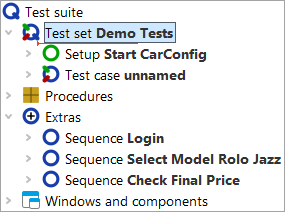
Next we want to turn the two previously recorded sequences into a test case.
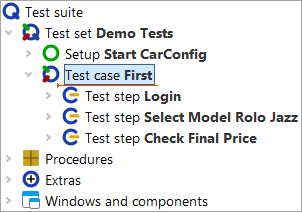
- Action Rename the Test case node from "unnamed" to "First".
- Open the Test case node by clicking the ">" symbol.
- Move the two sequences from the Extras section into the test case.
If you do not open the Test case node, QF-Test will try to insert the sequence nodes after the Test case node at the same level. However, this is not permitted for sequence nodes.
QF-Test always records sequences. These serve the same purpose as test steps. Test steps, however, are listed in the report. You can convert between them, which we will demonstrate for information in the following steps.
- Action Open the context menu for the first of the two sequence nodes with the right mouse button.
- Choose »Convert node to...«-»Test step«.
- Do the same for the second sequence node.
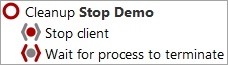
On Android and iOS the shutdown of the emulator/simulator cannot be recorded.
Instead, use a Stop program node.
With that we have completed the most important steps to structure our test suite.