
19.8 A full Test Run
After examining how the individual elements of the test set work, look at the functionality provided by the test set node.
- ActionFirst, close the CarConfigurator application in case it is still running.
- Then select the "Test set: Simple Tests" node.
-
Execute it with the replay button
 .
.
The result dialog will appear after test execution, reporting the error caused by the second test case.
-
ActionOpen the run log again by
 to take a closer look:
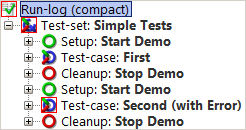
This shows the special behavior of Setup / Cleanup nodes in a test set: They are executed before and after each test case to help achieve a proper starting state for each test case.
Note Stopping the SUT after each test case is not the smartest way to ensure a clean state. There are more elegant ways for setup and cleanup that will be explained with the advanced features in this tutorial ("Dependencies: Automatically ensuring correct prerequisites for each Test case").