
35.1 If - else
You already came across If nodes in the Setup sequence in the chapter Starting and Connecting the Device. Let's have a closer look at the details of the node.
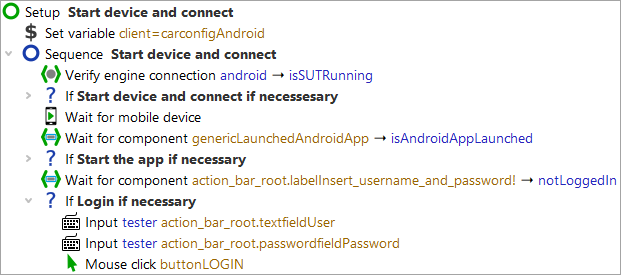
By means of an If node you can control whether certain nodes
will be executed or not. In our
case, this concerns logging in to the Carconfig app. First, we need to determine whether we
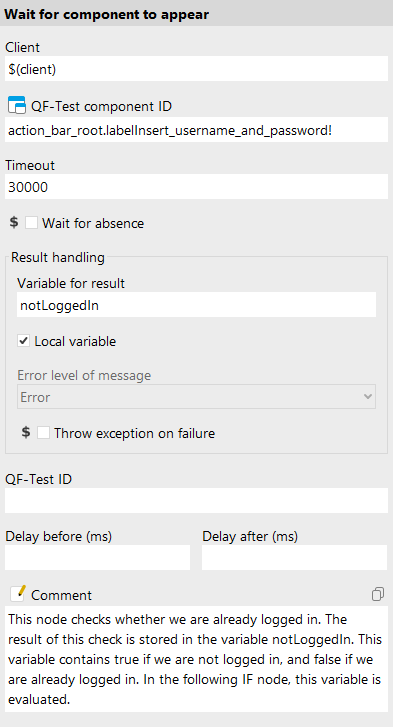
are already logged in. This is done via the Wait for component to appear node, which writes either true
or false to the notLoggedIn variable.
The If node has a Condition attribute where you'll find an
expression evaluating the result variable notLoggedIn. As we want to refer
to its value we need to use the syntax $() (see also note on variable syntax
in chapter "Procedure with a Variable").
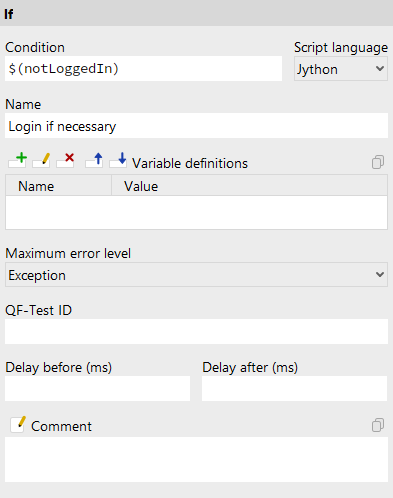
Depending on whether you are already logged in, QF-Test will either execute the nodes contained in the If node or not.
In the variable definition table, you can check the value of the notLoggedIn
variable. When the first Test case's is executed, the value is true, and
thus the condition $(notLoggedIn) is true, which means the login nodes are
executed. During the second Test case's, the value is false, and therefore
the condition is false. The nodes in the If node are skipped.
Note In an Elseif node, an additional condition is specified, which is evaluated if the condition in the If node is not met. The child nodes of the Else node are only executed if neither the condition of the If node nor that of the Elseif node applies.