
33.1 Procedure with a Variable
Take a look at the last test step "Check final price" in our two test cases.
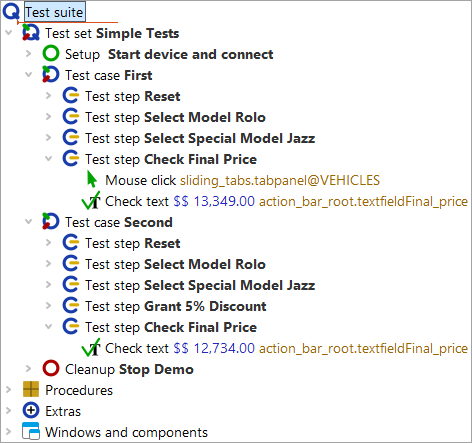
The same step is executed, but with different data. Even if it is just a single step,
it makes sense to turn it into a procedure. We might later decide to convert the
hard-coded values 13.349,00 € and 12.734,00 € to another format so that
the check on the "Final price" field works for other currencies as well. Implementing
such logic twice would definitely not be sensible.
- Action Select the Check text node in the first test case.
- Choose the menu »Operations«-»Wrap node into«-»Sequence« or use the keyboard shortcut Ctrl+Shift+S to wrap it into a sequence.
- Name the sequence 'checkFinalPrice'. This name follows the Java convention of concatenating words. On the other hand, QF-Test also allows spaces in procedure names, so you do not have to follow the Java convention.
- Press Ctrl+Shift+P to quickly convert the sequence node into a procedure (as known from the previous chapter). As you can see, the sequence is replaced by a procedure call to "checkFinalPrice".
- Double-click the procedure call to jump to the procedure in the Procedures node.
- Open the newly created procedure node to see its contents.
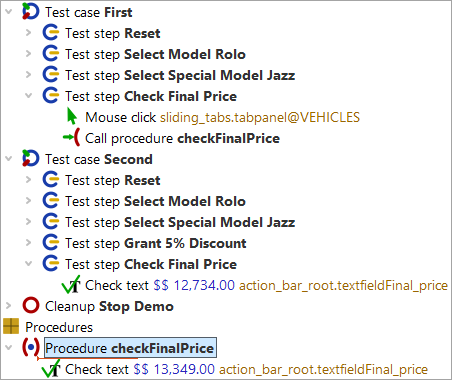
As expected, the Check text node is inside the procedure. However, it is only valid
for a single price, namely 13.349,00 €. Since we also want to use the same procedure for the
second test case, we need to replace the price with a variable. The value of this variable
should then be passed when calling the procedure.
In the next example we will add a parameter with a default value in the procedure node. Default values are often used when the corresponding parameter would receive that value in most procedure calls. Then you don't need to specify the default value every time and can rely on the value defined in the procedure node. Although this does not apply to the price parameter, we can use it here to show how a default value works and how it can be overridden with another value when needed.
First, let’s add a variable with a default value:
- Action Select the procedure 'checkFinalPrice'.
-
Press the "Insert row" button
 above the "Default values for parameters" table.
-
Enter
priceas the name of the parameter. -
Enter
13.349,00 €as the value. - Press OK.
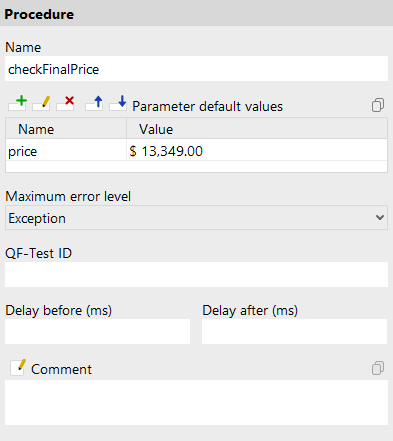
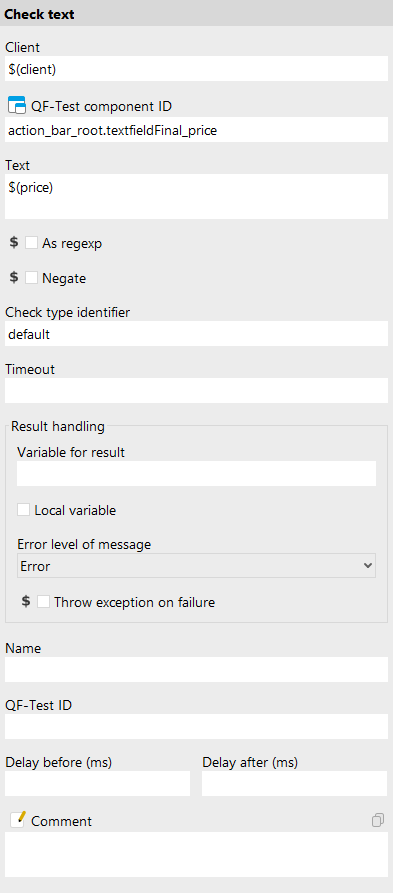
In the next step, we replace the value of the Text attribute of the Check text node with a reference to the variable.
Note Variable syntax: When working with variables it is important to understand that in some places you tell QF-Test what the name of a variable is and in others you tell QF-Test to access the value of a variable.
In the example above, QF-Test is informed of the variable name in the name column of the default values table.
In that case you only needed to enter price.
In the Text attribute of the Check text node, the value of the variable should be used.
In QF-Test this is done by putting the variable name in $(), here $(preis). If you do not wrap
the variable name in $(), QF-Test would compare the price with the literal string price.
- Action Select the Check text node in the procedure "checkFinalPrice".
-
Enter
$(preis)in the Text attribute of the Check text node details. - Press 'OK' in the node details.
- Action
 Execute the first test case.
The test case should run without errors.