
33.4 Setting Variables
In addition to the methods described above, variables can also be set as follows:
- Via a Set variable node,
- as a Procedure node's Return value,
- as the result of a QF-Test node like Fetch text, Fetch geometry, Fetch index and Check,
- in the 'Variable bindings' table of Test suite, Test case, Test step, Sequence and other nodes like If or Loop,
- via command line parameters.
Information about where a variable is best defined can be found in the next section.
A Set variable node can be inserted via the menu »Insert«-»Misc nodes«-»Set variable«. In the node details you can specify whether it should be a local variable (tick the Local variable check box) or a global variable.
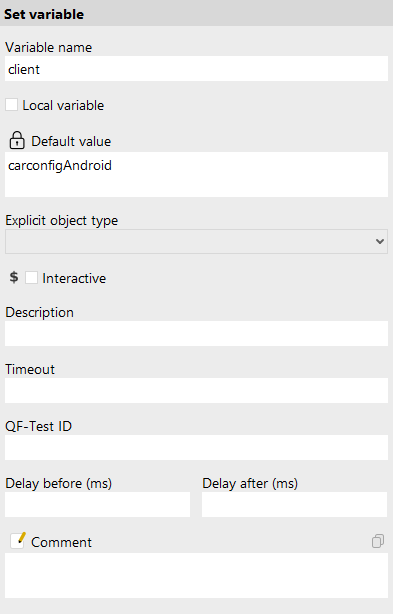
The following figure shows the details of a Set variable node that you can find as the first node in the
Setup node. A variable named client is defined. You can tell that it is a global variable
because the Local variable check box is not set.
If a variable should be set with the return value of a procedure, specify the variable name in the "Variable for return value" attribute of the procedure call. In the procedure itself you must insert a Return node as the last node to be executed to return the relevant value.
The procedure in the following figure reads the discount value from the SUT and returns it to the calling test case.
There, the receiving variable is named Rabatt and is declared as a local variable. This example is not included
in the exercise test suite.
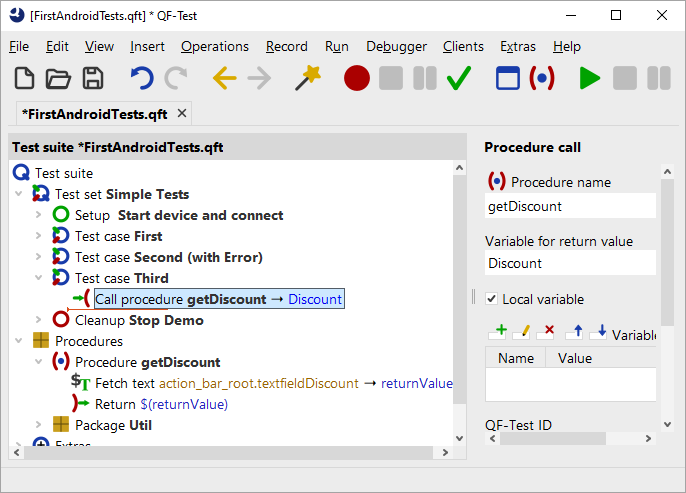
The Fetch text node in the figure above is one of the QF-Test nodes that directly set the value of a variable. The variable name is entered in the accordingly named attribute. Again, you can choose whether it should be a local or a global variable.
There are a number of nodes that have a Variable definitions table. There, you can set local variables. If the respective node is inside a procedure, the variable is bound as a local variable to the procedure, otherwise as a local variable to the test case. Variables that are bound to the test suite node via this table can be referenced by all nodes in the test suite.
All nodes to which variables can be bound are displayed in the "Variable bindings" panel at the bottom right in debugger mode, when they are currently being executed.
Variables can also be specified via the command line. Use the command line parameter -variable, e.g.
qftest -batch -variable "browser"="ie" test.qft. For further information see the manual, chapter 'Command line arguments'.