
33.2 The "Variable Bindings" Table
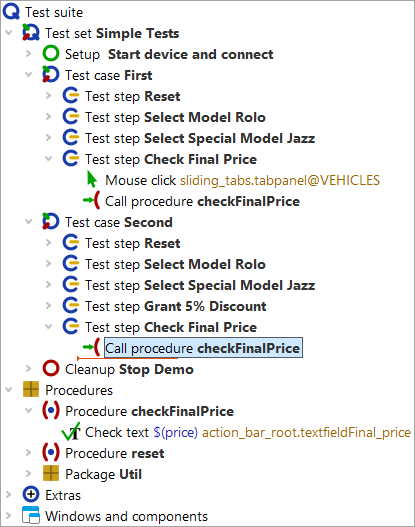
In the next step we add a procedure call in the second test case.
- Action Replace the Check text node of the second test case with a procedure call to "checkFinalPrice". You can simply copy the procedure call from the first test case or insert it as described above.
Note If the procedure call already shows the price with its default value, this is because the procedure call was generated using the procedure itself, either by copying the procedure, via drag and drop using the procedure node, or by direct insertion of the procedure as explained further above. For the current topic we focus on the default value. Therefore, please delete any existing price parameter if you are following the tutorial step by step. To do so, click the red X above the "Variable bindings" table.
- Action Make sure the debugger is configured to break on errors (see Debugger options: stop test on error).
- Select the node "Test case: Second".
-
Execute it either via the button
 or by pressing the
Enter key.
or by pressing the
Enter key.
An error message indicates that a different price than the one displayed was expected. What went wrong? Let’s investigate the error. Usually we would look into the run log, but there is another important source of information.
- Action Click OK to close the error message.
In debugging mode you can see a list of nodes with variables bound by them at the bottom right of the QF-Test window.
- Action You may need to enlarge the "Variable bindings" table to see all entries.
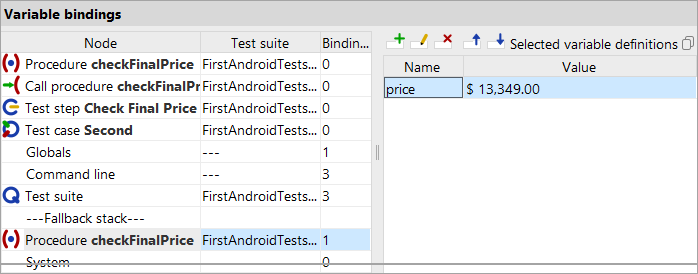
The "Variable bindings" table is very helpful during debugging because it shows the current values of variables. It supports working with procedures and helps understand how QF-Test determines the correct variable value.
Note QF-Test processes the "Variable bindings" table from top to bottom.
You see that in the first lines no variables are bound. At the "Global variables" level one variable is bound, and on the secondary stack for "Procedure: checkFinalPrice" another one. The global variable is used for the connection to the SUT application and was set before application startup (cf. Starting and Connecting the Device). The other variable is of more interest right now — but it has the wrong value.
This value on the secondary stack is the default value, which is used when no variable with the same name is assigned a value elsewhere.
To fix this, we need to pass the correct value to the procedure in the procedure call. Again, there are several ways to do this. One way would be to add a new row in the "Variable bindings" table in the details of the procedure call, similar to how we did it in the procedure node in the previous section.
If there are already multiple procedure calls, the following is simpler:
- Action
Stop the running test execution via
 .
.
-
Right-click the Procedure node and choose
»More node operations«-»Adjust parameters of references«
in the popup menu.
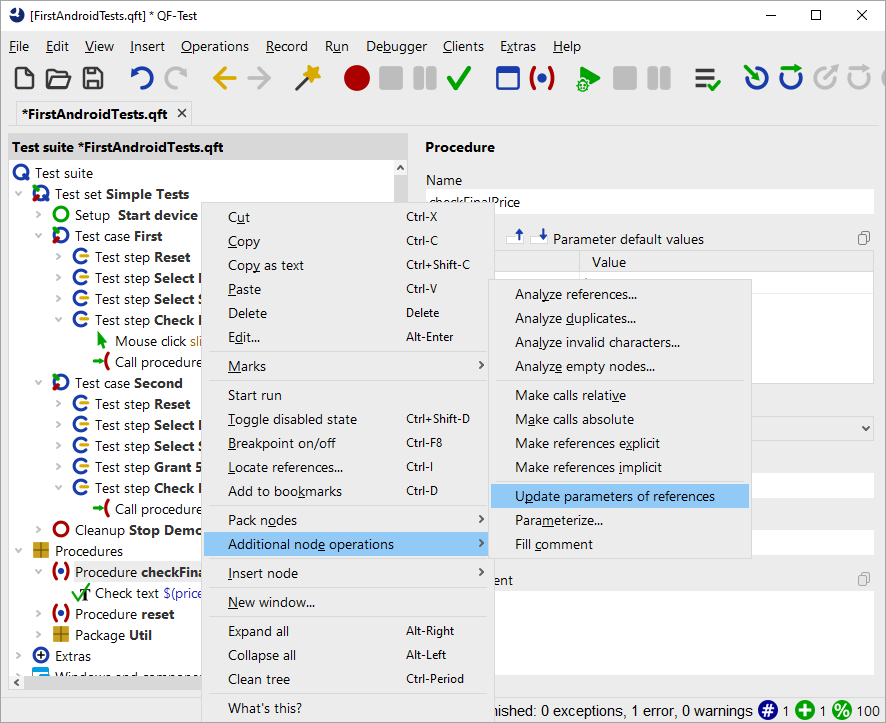
Figure 33.7: Popup menu for "Adjust parameters of references" - In the following dialog, ensure the checkbox »Add missing parameters at caller« is set, and confirm with OK.
In the procedure call, QF-Test creates a row in the "Variable bindings" table for each default value.
In our case, a row has been added for the parameter named price with the value 13.349,00 €.
Even so, it will still not work in the second test case, even though the value is passed directly, because it is still the default value which is not correct here. Please do not change the value yet, so we can use the resulting error to demonstrate another debugging method.
- Action Close the "Adjusted nodes" dialog that QF-Test shows to inform you about completed nodes.