
32.2 Stepping through Execution
Now we want to execute the test cases step by step.
- Action
Please experiment a bit with
"Step in"
 ,
"Step over"
,
"Step over"
 and
"Step out"
and
"Step out"
 .
.
As you will have noticed, "Step in" opens a node with children and makes the first child node the active node.
This is, as always, indicated by the arrow marker on the node.
If you continue from the point where execution of the test suite was paused in the last section, i.e. from the node "Test case: First", the test case would now be opened:
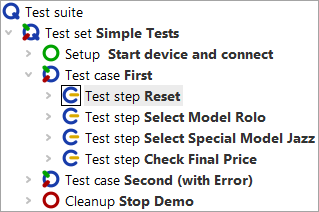
In the case of a leaf node, i.e. a node that has no children, the effect is the same as the following function.
With the button "Step over"
a node including all its child nodes is executed. The next node to be executed at the same level then becomes the active one
and gets the arrow.
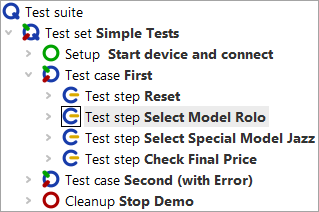
"Step out" executes the remaining sibling nodes and stops at the next node
to be executed on the parent hierarchy level.
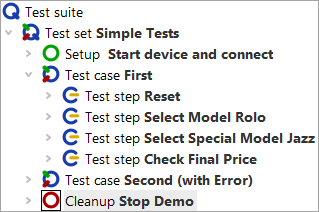
In the example this is the Cleanup node. As already explained in the first chapter A full Test Run, Setup and Cleanup nodes have the special property of being executed before and after each test case to establish a defined starting state for every test case.
Note This behavior only occurs if you started the complete test suite or the test set and are in debugger mode. If no test execution was active and you had only selected the test case, the "Step over" function causes the test case to be executed and then the next test case to be selected.
- Action
Execute the Cleanup and Setup nodes by using
to execute the entire nodes and then
to open the second test case.
This is preparation for the next chapter about skipping nodes.
Note
Please note during interactive test creation with menus and comboboxes that these often collapse when the application loses focus,
which is the case when switching to debugger mode. In such cases it is advisable to execute the node that opens a menu or combobox
together with the node that performs the selection, i.e. do not switch to debugger mode in between. For example, you can achieve this
by setting a breakpoint  after the node that performs the selection and,
when reaching the node that opens the menu or combobox, resume test execution by releasing the Pause button
after the node that performs the selection and,
when reaching the node that opens the menu or combobox, resume test execution by releasing the Pause button
 .
.