
AI43.11 Artificial Intelligence
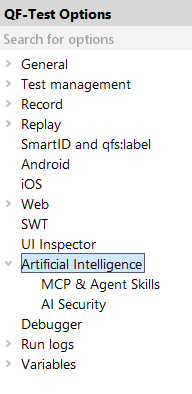
The following options serve to integrate LLMs ("Large Language Models") with QF-Test.
10.0+43.11.1 General AI options
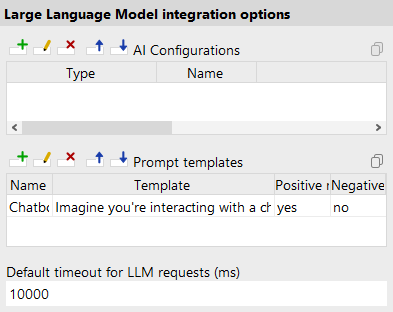
- Block AI features (System)
- Server (automatically forwarded to SUT) script name:
OPT_BLOCK_AI
With this option, you can deactivate all functions in QF-Test that perform LLM calls or provide interfaces for AI tools.
If, for example, a company policy requires that used software must not provide any AI functionality, this can also be enforced during installation on Windows. On Linux/macOS, the files
lib/langchain4j.jarandlib/mcp.jarmust be removed from the installation directory instead. - LLM Configurations (System)
- Server script name:
OPT_LLM_PROVIDERS
In this table you can make third-party LLMs usable in QF-Test, for example to use them with the Check text with AI, the AI Instruction, or
ai.ask()(see The ai module and Using Artificial Intelligence). Each line represents a specific language model.The following table columns are available:
- Type
- The name of the API provider or type. If the API type you need is not yet available, please get in touch with our support team.
- Name
- The name of this configuration. Used to reference it in other places.
- URL
-
The URL at which the LLM can be accessed.
Please get this information from the documentation of the LLM provider.
Usually ends with
/v1or similar. - API key
- The API key serves to authenticate with the respective LLM provider. Get it from your LLM provider.
- Model name
- Many providers offer multiple LLM models like "gpt-4o" or "gemini-2.0-flash". You can learn about the actually available model names from your LLM provider.
- Connection timeout for LLM requests (ms) (System)
- Server script name:
OPT_LLM_REQUEST_TIMEOUT
The connection timeout for LLM requests in milliseconds. If a connection to the LLM provider cannot be established within the configured duration, an exception is thrown.
- Disable SSL verification for LLM requests (System)
- Server script name:
OPT_LLM_REQUEST_DISABLE_SSL_VERIFICATION
In case SSL issues occur during communication with an LLM, you can use this option to disable SSL verification for all network communication with external LLM models.
11.0+43.11.2 Agent skills options
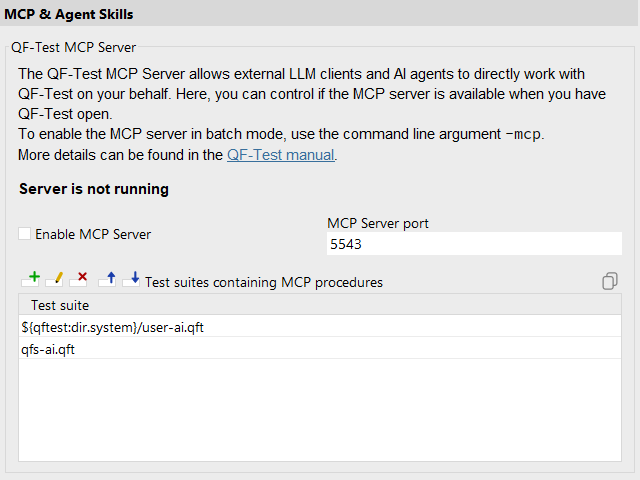
- Enable the embedded MCP server (System)
- Server script name:
OPT_ENABLE_MCP
Enable this option to activate the embedded MCP server when QF-Test runs in interactive mode. The MCP server exposes QF-Test's automation capabilities to external AI clients via the Model Context Protocol. For setup details, see "Set up QF-Test MCP Server".
To enable the MCP server in batch mode, use the command line argument
qftestinstead.-batch-mcp - MCP Server Port (System)
- Server script name:
OPT_MCP_PORT
Sets the TCP port on which the embedded MCP server listens. The default port is
5543. If QF-Test runs on the same machine as the QF-Test license server, this port must be changed to avoid a conflict.To set the MCP server port in batch mode, use the command line argument
qftestinstead.-batch-mcp=port - Test suite files for MCP tools and prompts (System)
- Server script name:
OPT_MCP_SUITES
When the MCP server starts, QF-Test scans the procedures in the listed test suite files for
@mcpdoctags. Procedures annotated accordingly are exposed as MCP tools or prompts to connected AI clients and to the internal AI features. These suites (and only these) are scanned in list order for a prompt/tool name and the first match is used. Included files are not scanned for@mcpdefinitions for security reasons, but can be used within the procedure execution. For details, see "Create Custom MCP Tools and Prompts".By default, the standard AI library
qfs-ai.qftis included, providing many of the Built-in MCP Tools. In addition, the user AI libraryuser-ai.qftfrom the system specific config directory (see "The configuration files") is included, so it is possible to extend or overwrite default prompts and tools. These files can be opened and inspected from the »File« menu under »Bookmarks«.
11.0+43.11.3 AI security options
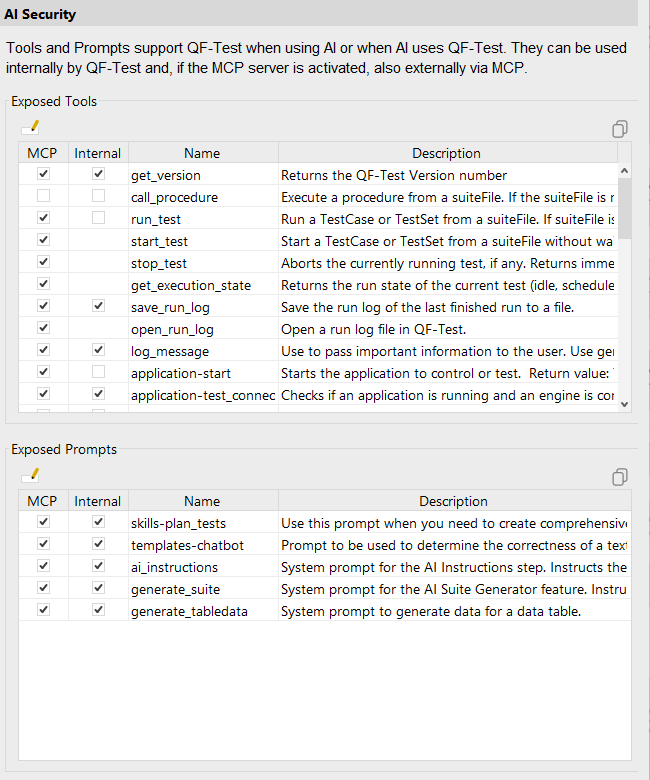
MCP tools and prompts extend QF-Test's AI capabilities, either used internally by QF-Test or exposed externally to AI clients via the MCP server. This panel lets you control which features are active for each use case.
- Exposed tools (System)
-
Lists all available MCP tools with two activation checkboxes per row. The MCP column controls whether the tool is exposed via the embedded MCP server to external AI clients. The Internal column controls whether the tool is available to QF-Test's own AI features. Settings for tools that are currently unavailable (for example, from a test suite not currently referenced) are retained and restored if the tool reappears.
To control tool exposure during batch mode execution from command line, use
qftest-batch-mcp-variableAIExposeMCPTools=tool_name:true,other_tool_name:falseThe MCP column is disabled if QF-Test cannot provide an embedded MCP server in the current installation.
- Exposed prompts (System)
-
Lists all available MCP prompts with two activation checkboxes per row. The MCP column controls whether the prompt is exposed via the embedded MCP server to external AI clients. The Internal column controls whether the prompt is available to QF-Test's own AI features. Once you explicitly change a setting, it is preserved across restarts. Settings for prompts that are currently unavailable are retained and restored if the prompt reappears.
NoteMany of the prompts shipped with QF-Test are used internally to provide AI features such as the "Check text with AI" node. Disabling these prompts will cause errors when the corresponding features are executed.
To control prompt exposure during batch mode execution from command line, use
qftest-batch-mcp-variableAIExposeMCPPrompts=prompt_name:true,other_prompt_name:falseThe MCP column is disabled if QF-Test cannot provide an embedded MCP server in the current installation.