
28.1 Loading the Test suite
Note On first startup of QF-Test and/or the System Under Test (SUT) via QF-Test you might get a security warning from the firewall asking whether to block the Java network communication. As QF-Test communicates with the SUT by means of the Java network protocols, this must not be blocked by the local firewall in order to allow automated testing.
After starting up QF-Test, you can immediately bring up our first example test suite:
-
ActionPress the
 toolbar button to bring up the file open dialog.
-
Navigate to the subdirectory
qftest-11.0.2/doc/tutorialof your QF-Test installation. -
There select the file
FirstAndroidTests.qftand open it. If you want to use the tutorial for iOS, please selectFirstIOSTests.qft.
QF-Test will then load the indicated test suite which should look as follows:
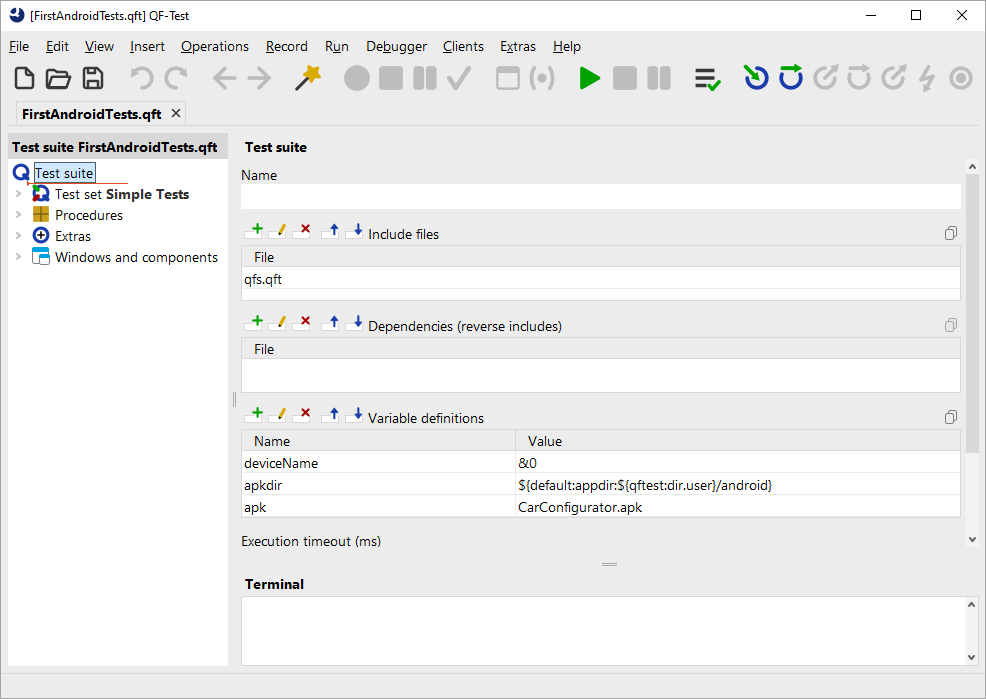
The left part of the main window contains the test suite,
organized in a tree structure.
The right side shows the details of the currently selected tree node.
At bottom right you'll see the terminal displaying messages sent by QF-Test and the application you are testing.
In the tree structure of the main window you can navigate and select individual nodes of the test suite.
- ActionDouble click the node Test set: Simple Tests to expand it and reveal its child nodes.
The test set contains two test case nodes enclosed by a Setup/Cleanup pair, which mainly starts and stops the test application.
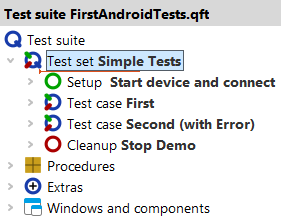
In the following sections we'll describe the purpose and function of the individual nodes.