
10.1+43.2 Test management options
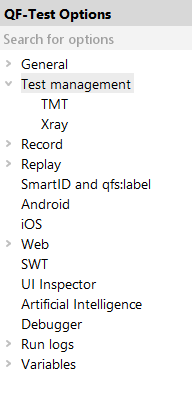
For integration with test management tools, several settings must be configured.
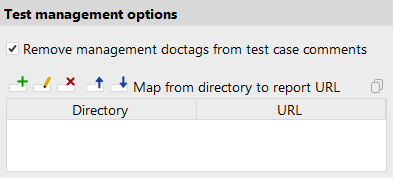
- Remove management doctags from test case comments (System)
-
When enabled, management doctags are removed from test case comments before reports are generated.
43.2.1 TMT settings
The following options are required for integration with TMT. Most options also have a corresponding command-line argument for batch report generation.
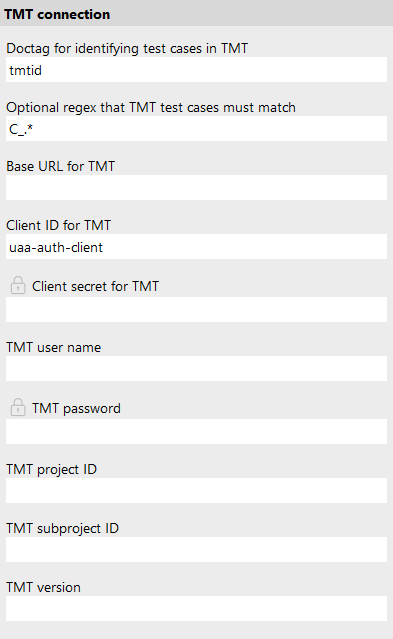
- Doctag for identifying test cases in TMT (System)
-
Specifies the doctag used to identify and associate QF-Test Test case nodes with test cases in TMT. The leading @ character is optional. The default value is
tmtid. - Optional regex that TMT test cases must match (System)
-
Defines an optional regular expression that doctag values must match to be considered valid test case identifiers.
The
@tmtiddoctag can also be used for linking to TMT test suites or folders (the logical equivalent for Test set nodes). However, QF-Test needs to reliably identify test cases as such. In TMT, test case identifiers are of the formC_<number>, so the default value for the regex isC_.*. - Upload screenshots to TMT (System)
-
Whether to upload screenshots to TMT after reporting test results. Default is true.
- Base URL for TMT (System)
-
Specifies the base URL of the TMT server to connect to.
- Client ID for TMT (System)
-
Specifies the client ID used for authenticating with the TMT API. The default value is
uaa-auth-client, which is suitable for most TMT installations. - Client secret for TMT (System)
-
Specifies the client secret used for authenticating with the TMT API. May be encrypted using the ${decrypt:...} format.
Note Click the padlock button next to the input field to encrypt the value. The encrypted form
${decrypt:...}is strongly recommended over plain text. - TMT username (User)
-
The username used to authenticate with TMT.
- TMT password (User)
-
The password associated with the specified TMT user. May be encrypted using the ${decrypt:...} format.
Note Click the padlock button next to the input field to encrypt the value. The encrypted form
${decrypt:...}is strongly recommended over plain text. - TMT project ID (System)
-
Specifies the ID of the TMT project to which test results are uploaded.
- TMT subproject ID (System)
-
Specifies the ID of the TMT subproject to which test results are uploaded. Leave empty if the project does not use subprojects.
- TMT version (System)
-
Specifies the version within the TMT subproject (if specified) or the TMT project to which test results are uploaded.
43.2.2 Xray settings
The following options are required for integration with Xray. Most options also have a corresponding command-line argument for batch report generation. Options marked "Cloud only" are not used for Xray Data Center.
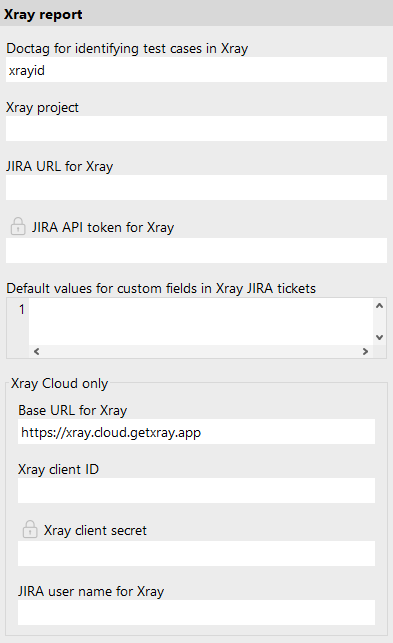
- Doctag for identifying test cases in Xray (System)
-
Specifies the doctag used to identify and associate QF-Test Test case nodes with test cases in Xray. The leading @ character is optional, the default value is
xrayid. - Xray project (System)
-
Specifies the JIRA project key for Xray test executions. This is the prefix of JIRA issue keys, e.g.,
PROJfor issues likePROJ-123. - Upload screenshots to Xray (System)
-
Whether to upload screenshots to Xray after reporting test results. Default is true.
- JIRA URL for Xray (System)
-
Specifies the base URL of the JIRA instance that contains Xray.
- JIRA API token for Xray (User)
-
For Xray Cloud: the API token used to authenticate the specified JIRA user. For Xray Data Center: a Personal Access Token (PAT), used directly as a Bearer token; no JIRA username is required. May be encrypted using the ${decrypt:...} format.
Note Click the padlock button next to the input field to encrypt the value. The encrypted form
${decrypt:...}is strongly recommended over plain text. - Default values for custom fields in Xray JIRA tickets (System)
-
Creating a new Xray test execution ticket in JIRA may require setting certain custom attributes to default values, especially if they are mandatory. Values specified in this option are automatically included in the respective APIs request. The format is a comma-separated list suitable for a JSON array.
- Base URL for Xray (Cloud only) (System)
-
Specifies the base URL of the Xray Cloud API endpoint, typically
https://xray.cloud.getxray.app. This option also controls variant selection: if it is empty, QF-Test connects to an Xray Data Center installation; if it is set, the Xray Cloud API is used.Note Leave this option empty to use Xray Data Center. Do not enter the URL of your JIRA server here - that URL belongs in JIRA URL for Xray.
- Xray client ID (Cloud only) (User)
-
The client ID used for authenticating with the Xray Cloud API. Not used for Data Center.
- Xray client secret (Cloud only) (User)
-
The client secret associated with the specified Xray client ID. Not used for Data Center. May be encrypted using the ${decrypt:...} format.
Note Click the padlock button next to the input field to encrypt the value. The encrypted form
${decrypt:...}is strongly recommended over plain text. - JIRA username for Xray (Cloud only) (User)
-
The JIRA username used for authentication with JIRA. Not used for Data Center, which authenticates via a Personal Access Token (PAT) directly.