
44.5 Procedures
Procedures are a means to collect some of the basic building blocks of a test suite like events and checks into a larger, reusable structure.
Procedures can be called from any other part of the test suite and even from different suites (see "Referencing nodes in another test suite"). You can pass parameters to a procedure in the form of variable definitions (see "Variables").
A typical example would be a procedure that selects a menu item in a menu. Its parameters could be the client name of the SUT, the name of the menu and the name of the menu item.
44.5.1 Procedure
|
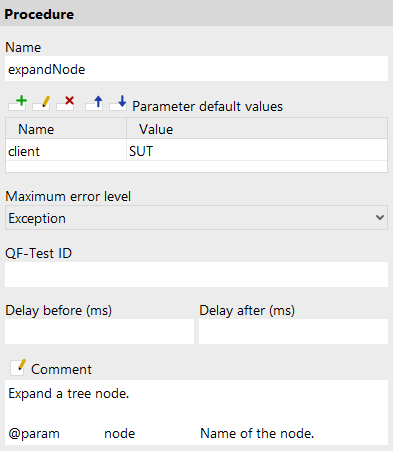
A Procedure is a Sequence that is executed from some other place by a Procedure call. The parameters of the procedure are not defined explicitly. Instead they are a consequence of the variable references in the children of the Procedure. You may want to define fallback values for some or all of the parameters in the Variable definitions. In any case it is a good idea to document the required parameters in the Comment attribute. A Procedure can return a value to the calling node with the help of a Return node. Without such a node a Procedure implicitly returns the empty string. |

Contained in: Package, Procedures
Children: Any
Execution: The Procedure's variables are bound as fallback values. The child nodes are executed one by one, then the fallback values are unbound again.
Attributes:
- Name
-
A Procedure is identified by its name and the names of its Package ancestors, so you should assign a name with a meaning that is easy to recognize and remember.
Variable: No
Restrictions: Must not be empty or contain the characters '.' or '#'.
- Variable definitions
-
Here you can define default or fallback values for the Procedure's parameters (see "Variables"). Defining these values also serves as documentation and is a valuable time-saver when using the dialog to select the Procedure for the Procedure name attribute of a Procedure call. See "Tables" about how to work with the table.
In case you want to re-set the order of the parameters like they are sorted in the called procedure, you can select »Re-set parameter order«.
Variable: Variable names no, values yes
Restrictions: None
- Maximum error level
-
When a warning, error or exception occurs during a test run, the state of the corresponding node of the run log is set accordingly. This state is normally propagated to the parent node in a way that ensures that the error state of a run log node represents the worst of its child nodes' states. Using this attribute, the maximum error state that the run log node for a sequence will propagate, can be limited.
Note This value has no effect on the way exceptions are handled. It only affects the error states of the run log nodes and by that the exit code of QF-Test when run in batch mode (see. "Starting QF-Test"). It also has no effect on the creation of compact run logs (see command line argument
-compact). The node for a sequence in which a warning, error or exception occurs is never removed from a compact log, even if the error is not propagated due to the setting of this attribute.Variable: No
Restrictions: None
- QF-Test ID
-
At the moment the QF-Test ID attribute has no meaning for this type of node.
Variable: No
Restrictions: Must not contain any of the characters '\', '#', '$', '@', '&', or '%' or start with an underscore ('_').
- Delay before/after
-
These attributes cause a delay before or after the execution of the node. If a value is empty, the Default delay from the global options is used.
Variable: Yes
Restrictions: Valid number >= 0
- Comment
-
Here you can enter a comment that explains the purpose of this node. This is the preferred way of documenting the test suite.
Note For detailed documentation, especially for Test set, Test case or Procedure nodes, this text area might not be the right place. There are many excellent editors that are much better suited to this task. The option External editor command lets you define an external editor in which comments can be edited conveniently by pressing Alt+Return or by clicking the
 button.
You can trigger special behaviors of some nodes using doctags, please see Doctags.
If you enter text in the comment field of a Component node, the node will be considered as 'used' when you want to mark or delete unused components.
Variable: Yes
Restrictions: None
44.5.2 Procedure call
|
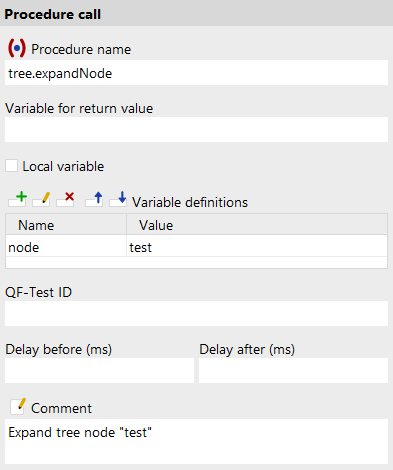
This node calls a Procedure in the same or a different test suite, meaning that execution continues in the Procedure. When the Procedure is finished, the value returned by the Procedure is bound to the variable defined in the Variable for return value attribute and execution returns to the Procedure call and thus to its parent node.
The name of the Procedure to call is determined by its
Name and the Names of its
Package parents. These are concatenated with a dot ('.') as
separator, starting with the outermost Package and ending in
the Procedure's name. Thus to call a Procedure named
See "Referencing nodes in another test suite" about how to call a Procedure in a different test suite. |

Contained in: All kinds of sequences.
Children: None
Execution: The Variable definitions of the Procedure call are bound, the target Procedure is determined and execution passed to it. After the Procedure returns, the Procedure call's variables are unbound again.
Attributes:
- Name
-
The full name of the Procedure, created from the Names of its Package parents and its own Name, joined by a dot. The "Select procedure" button
![[Select procedure]](icons/select_procedure.png "Select procedure") above the attribute brings up a dialog in which you can select the Procedure
interactively. By selecting the "Copy parameters" checkbox you
can adopt the Procedure's default values as parameters for the
Procedure call node to save typing.
above the attribute brings up a dialog in which you can select the Procedure
interactively. By selecting the "Copy parameters" checkbox you
can adopt the Procedure's default values as parameters for the
Procedure call node to save typing.
Variable: Yes
Restrictions: Must not be empty.
- Variable for return value
-
The value returned by the Procedure, either through a Return node or the empty string, is bound to the variable defined in this optional attribute. Additionally, the most recent return value is always available as the special variable ${qftest:return}.
6.1+ The name of the variable shows in the test suite tree - in blue when it is a global variable, in black when it is local.
Variable: Yes
Restrictions: None
- Local variable
-
This flag determines whether to create a local or global variable binding. If unset, the variable is bound in the global variables. If set, the topmost current binding for the variable is replaced with the new value, provided this binding is within the context of the currently executing Procedure, Dependency or Test case node. If no such binding exists, a new binding is created in the currently executing Procedure, Dependency or Test case node or, if there is no such node in the topmost node on the variables stack, falling back to the global bindings if necessary. See "Variables" for a detailed explanation of variable binding and lookup.
In order to predefine the option use Enable 'Local variable' attribute by default.
Variable: No
Restrictions: None
- Variable definitions
-
This is where you define the parameter values for the Procedure (see "Variables"). See "Tables" about how to work with the table.
Variable: Variable names no, values yes
Restrictions: None
- QF-Test ID
-
At the moment the QF-Test ID attribute has no meaning for this type of node.
Variable: No
Restrictions: Must not contain any of the characters '\', '#', '$', '@', '&', or '%' or start with an underscore ('_').
- Delay before/after
-
These attributes cause a delay before or after the execution of the node. If a value is empty, the Default delay from the global options is used.
Variable: Yes
Restrictions: Valid number >= 0
- Comment
-
Here you can enter a comment that explains the purpose of this node. This is the preferred way of documenting the test suite.
Note For detailed documentation, especially for Test set, Test case or Procedure nodes, this text area might not be the right place. There are many excellent editors that are much better suited to this task. The option External editor command lets you define an external editor in which comments can be edited conveniently by pressing Alt+Return or by clicking the
button.
You can trigger special behaviors of some nodes using doctags, please see Doctags.
If you enter text in the comment field of a Component node, the node will be considered as 'used' when you want to mark or delete unused components.
Variable: Yes
Restrictions: None
44.5.3 Return
|
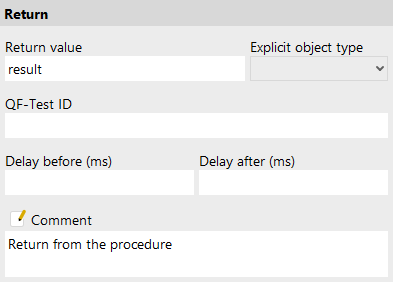
This node can be used to return from a Procedure prematurely and also to pass a return value to the calling node.
From a script, the same effect can be achieved by raising a
|

Contained in: All kinds of sequences.
Children: None
Execution:
A ReturnException is thrown. If it is caught by a matching Procedure, the
Procedure is terminated and the return value passed to the caller. If the node is
executed outside a Procedure it will lead to an error.
Attributes:
- Return value
-
The value to return from the Procedure. May be empty in which case the empty string is returned.
Variable: Yes
Restrictions: None
- Explicit object type
-
9.0+ QF-Test variables can contain strings or any other kinds of objects. The text field for the value only accepts string values but this attribute makes it possible to define how QF-Test should interpret the input:
- No selection: The input will not be further interpreted. In most cases, the stored object will be a String. If the input was completely replaced by the value of another variable by variable expansion, the object will be used without further interpretation.
- String: The input will be converted into a string.
-
Boolean: The input will be converted into a boolean value.
0, the empty string and the stringsfalse,noandneinwill be interpreted asfalse, other values astrue. -
Number: The input will be converted into a number. Depending on the input, this will be an Integer,
Long, BigInteger, Double or a BigDecimal object.
If the conversion fails, a
ValueCastExceptionwill be thrown. -
Object from JSON: The input will be interpreted as JSON string and converted into nested Maps and
Lists with Strings, Numbers, and Booleans.
If the conversion fails, a
ValueCastExceptionwill be thrown.
- QF-Test ID
-
At the moment the QF-Test ID attribute has no meaning for this type of node.
Variable: No
Restrictions: Must not contain any of the characters '\', '#', '$', '@', '&', or '%' or start with an underscore ('_').
- Delay before/after
-
These attributes cause a delay before or after the execution of the node. If a value is empty, the Default delay from the global options is used.
Variable: Yes
Restrictions: Valid number >= 0
- Comment
-
Here you can enter a comment that explains the purpose of this node. This is the preferred way of documenting the test suite.
Note For detailed documentation, especially for Test set, Test case or Procedure nodes, this text area might not be the right place. There are many excellent editors that are much better suited to this task. The option External editor command lets you define an external editor in which comments can be edited conveniently by pressing Alt+Return or by clicking the
button.
You can trigger special behaviors of some nodes using doctags, please see Doctags.
If you enter text in the comment field of a Component node, the node will be considered as 'used' when you want to mark or delete unused components.
Variable: Yes
Restrictions: None
44.5.4 Package
|
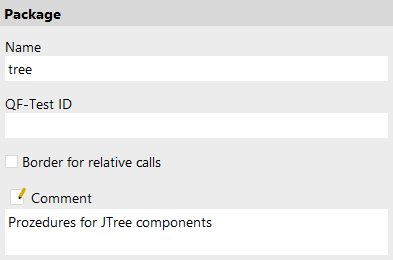
The only use of Packages is to structure the Procedures of a test suite. The Name of a Package is part of the Procedure's fully qualified name, as required by a Procedure call. |

Contained in: Package, Procedures
Execution: Cannot be executed.
Attributes:
- Name
-
The name of a Package is part of the identification of the Procedures it contains, so you should assign a name with a meaning that is easy to recognize and remember.
Variable: No
Restrictions: Must not be empty or contain the characters '.' or '#'.
- QF-Test ID
-
At the moment the QF-Test ID attribute has no meaning for this type of node.
Variable: No
Restrictions: Must not contain any of the characters '\', '#', '$', '@', '&', or '%' or start with an underscore ('_').
- Border for relative calls
-
This flag determines whether relative procedure calls, test calls or dependency references are allowed within that certain node. Relative calls passing that border are not allowed. If that attribute is not specified in the hierarchy, no relative calls are allowed.
Variable: No
Restrictions: None
- Comment
-
Here you can enter a comment that explains the purpose of this node. This is the preferred way of documenting the test suite.
Note For detailed documentation, especially for Test set, Test case or Procedure nodes, this text area might not be the right place. There are many excellent editors that are much better suited to this task. The option External editor command lets you define an external editor in which comments can be edited conveniently by pressing Alt+Return or by clicking the
button.
You can trigger special behaviors of some nodes using doctags, please see Doctags.
If you enter text in the comment field of a Component node, the node will be considered as 'used' when you want to mark or delete unused components.
Variable: Yes
Restrictions: None
44.5.5 Procedures
|
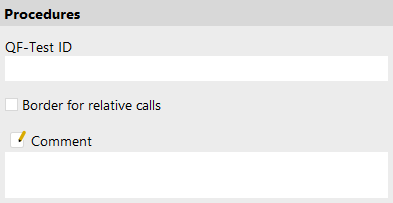
This is the root of all Packages and Procedures. |
Contained in: Root node
Execution: Cannot be executed.
Attributes:
- QF-Test ID
-
At the moment the QF-Test ID attribute has no meaning for this type of node.
Variable: No
Restrictions: Must not contain any of the characters '\', '#', '$', '@', '&', or '%' or start with an underscore ('_').
- Border for relative calls
-
This flag determines whether relative procedure calls, test calls or dependency references are allowed within that certain node. Relative calls passing that border are not allowed. If that attribute is not specified in the hierarchy, no relative calls are allowed.
Variable: No
Restrictions: None
- Comment
-
Here you can enter a comment that explains the purpose of this node. This is the preferred way of documenting the test suite.
Note For detailed documentation, especially for Test set, Test case or Procedure nodes, this text area might not be the right place. There are many excellent editors that are much better suited to this task. The option External editor command lets you define an external editor in which comments can be edited conveniently by pressing Alt+Return or by clicking the
button.
You can trigger special behaviors of some nodes using doctags, please see Doctags.
If you enter text in the comment field of a Component node, the node will be considered as 'used' when you want to mark or delete unused components.
Variable: Yes
Restrictions: None
11+44.5.6 Procedure call definition
|
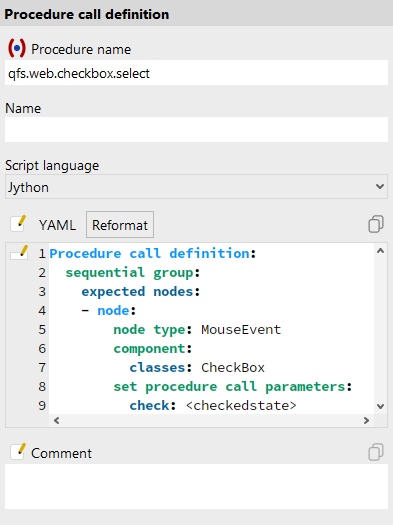
Use this to define which nodes can be grouped into a procedure call when you use the function for converting nodes into procedure calls. For more information see "Procedure calls: recording and converting". |
Contained in: Package, Procedures.
Children: None
Execution: The Procedure call definition node is evaluated during the execution of the conversion of nodes into procedure calls.
Attributes:
- Procedure name
-
The name of the Procedure that the created Procedure call references.
Either the full name of the Procedure, composed of the names of the parent Packages and the procedure itself, joined by '.', or just the name of the Procedure itself. In the latter case, when creating the Procedure call, the procedure name is extended by the names of the packages in which the Procedure call definition node is located.
Variable: Yes
Restrictions: Must not be empty.
- Name
-
The name of a sequence is a kind of short description. It is displayed in the tree view, so it should be concise and say something about the function of the sequence.
Variable: No
Restrictions: None
- Script language
-
This attribute determines the interpreter in which to run the script, or in other words, the scripting language to use. Possible values are "Jython", "Groovy" and "JavaScript".
Variable: No
Restrictions: None
- YAML
-
The configuration instructions for converting nodes to a procedure call. These are described in "Automatic creation of procedure call definitions".
The YAML code can either be generated for existing procedures, see "Automatic creation of procedure call definitions", or you can edit it directly. In that case, the context-sensitive menu you can open via the edit button
 to the left of the YAML code will help you.
If the configuration is invalid, corresponding error messages are
triggered when reformatting or when evaluated during the conversion process.
In the latter case the error messages will be written to the
"The Recording Log".
to the left of the YAML code will help you.
If the configuration is invalid, corresponding error messages are
triggered when reformatting or when evaluated during the conversion process.
In the latter case the error messages will be written to the
"The Recording Log".
Variable: Yes
Restrictions: Valid syntax
- Reformat
-
Clicking this button reformats the existing YAML code in the most compact form according to the syntax described in "YAML syntax of the Procedure call definition node". This also allows syntax errors to be detected.
This action is also performed implicitly every time the configuration is modified, e.g. via the edit menu.
- Handling of matching nodes
-
When the second option is selected, all matching nodes found by this definition are deleted rather than converted into procedure calls.
Variable: No
Restrictions: None
- Comment
-
Here you can enter a comment that explains the purpose of this node. This is the preferred way of documenting the test suite.
Note For detailed documentation, especially for Test set, Test case or Procedure nodes, this text area might not be the right place. There are many excellent editors that are much better suited to this task. The option External editor command lets you define an external editor in which comments can be edited conveniently by pressing Alt+Return or by clicking the
button.
You can trigger special behaviors of some nodes using doctags, please see Doctags.
If you enter text in the comment field of a Component node, the node will be considered as 'used' when you want to mark or delete unused components.
Variable: Yes
Restrictions: None