
44.11 WebAPI
This section provides detailed descriptions for the WebAPI nodes available for interacting with web services at API level. See "WebAPI – Web services testing" for a description of the ideas and concepts behind the following nodes.
WebAPI44.11.1 Web request
|
Send an HTTP(S) Request and handle the response.
Network and transport failures during request execution result in exceptions derived from
|

Contained in: All kinds of sequences except Pre- and Post-request handler and their children.
Children: Pre-request handler, Post-request handler.
Execution:
A WebRequest object is initialized and made available for scripting during the Pre-request
handling phase. The request is sent, the response received and made available for scripting as a
WebResponse object during the post-request handling phase. See "WebAPI scripting API"
for details of the web request scripting API in QF-Test.
Attributes:
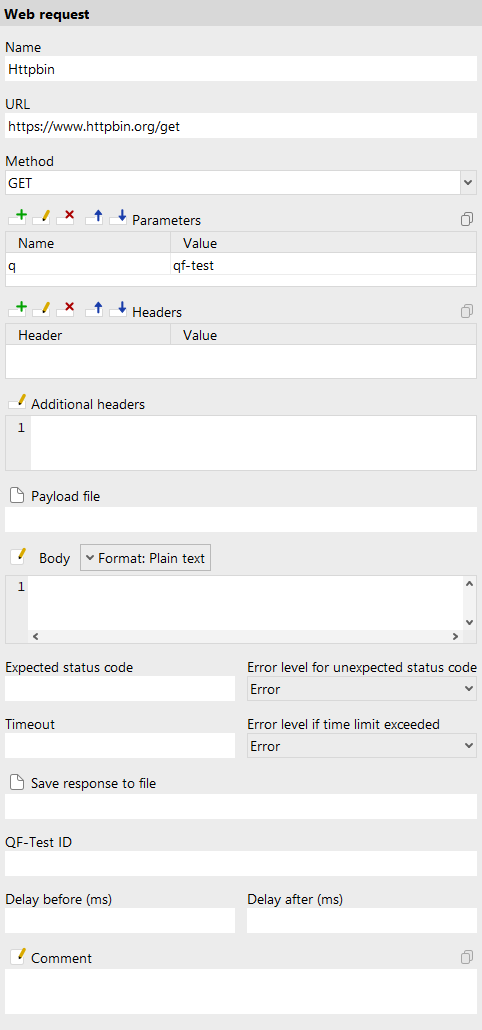
- Name
-
The name of a request step is a kind of short description. It is displayed in the tree view, so it should be concise and say something about the function of the request.
Variable: Yes
Restrictions: None
- URL
-
The URL to which to send the request, not including parameters. HTTP and HTTPS are acceptable values for the protocol. International Domain Names (IDN) are not supported, neither is the file:// protocol.
Variable: Yes
Restrictions: Must not be empty and correctly formatted.
- Method
-
This attribute defines the method of the request, one of GET, POST, HEAD, OPTIONS, PUT, DELETE, TRACE or PATCH. May also contain any kind of variable reference - the "$(requestMethod)" option in the drop down is just a common suggestion.
Variable: Yes
Restrictions: None
- Parameters
-
Here you can specify the parameters for the request. The parameters will automatically be URL encoded by QF-Test at execution time and appended to the URL specified above. See "Tables" for further information how to work with the table.
Variable: Yes
Restrictions: None
- Headers
-
Custom headers can be set via this table, each row containing the name and value of one header. See "Tables" for further information how to work with the table.
Variable: Yes
Restrictions: None
- Additional headers
-
As an alternative or in addition to the headers table, this field holds headers in text form which is easier for using variables and possibly excluding some headers. Each line holds one header in the format Header: Value.
Variable: Yes
Restrictions: Headers correctly formatted and separated by line breaks.
- Payload file
-
For methods like POST or PUT, that send data to a server, a file can be used for the payload. To inform the receiver of the request about the format of the file's contents, the "Content-Type" header should be set to the corresponding value. For more information about the "Content-Type" see: https://developer.mozilla.org/en-US/docs/Web/HTTP/Headers/Content-Type.
Variable: Yes
Restrictions: A path to an existing and readable file.
- Body
-
When not using a payload file, the body for the request can be specified directly in this field. For some common content types like plain text, JSON, XML/HTML or YAML, syntax highlighting is supported. You can specify which highlighting to use via the "Format:" drop down. Note that specifying a format does not affect the "Content-Type" header.
To inform the receiver of the request about the format of the body, the "Content-Type" header should to be set to the corresponding value. For more information about "Content-Type" headers see: https://developer.mozilla.org/en-US/docs/Web/HTTP/Headers/Content-Type.
Variable: Yes
Restrictions: None
- Expected status code
-
The expected status code or codes. Can be a single value X, a range X-Y or a comma-separated list of numbers and/or ranges.
Variable: Yes
Restrictions: None
- Error level for unexpected status code
-
The error level for an unexpected status code determines, how to show this in the run log and how to continue with test execution. At level "Exception", an
UnexpectedStatusCodeExceptionis thrown, immediately terminating the request. Similarly, for level "Error" the execution of any Post-request handler nodes is skipped and the test continues after the request step. To log an error but still run Post-request handlers, ignore the status code here and check it explicitly in a post request handler instead.Variable: No
Restrictions: None
- Save response to file
-
If set, the body of the response is written to this file. This enables QF-Test to download files. Existing files are overwritten, so be careful when using this attribute.
Variable: Yes
Restrictions: A path to a writable file.
- Timeout
-
Time limit in milliseconds for the HTTP request. When left empty, the global default from Default timeout for web request steps (ms) applies.
Variable: Yes
Restrictions: Must not be negative.
- Error level if time limit exceeded
-
Determines what happens when the response timeout or a connection refused error occurs. If set to "exception", a
CheckFailedExceptionis thrown. Otherwise a message with the respective error level is logged in the run log.When not set explicitly, the global default from Error level if timeout exceeded in web request step applies.
Note Connection timeouts always throw an exception, regardless of this setting.
Variable: No
Restrictions: None
- QF-Test ID
-
At the moment the QF-Test ID attribute has no meaning for this type of node.
Variable: No
Restrictions: Must not contain any of the characters '\', '#', '$', '@', '&', or '%' or start with an underscore ('_').
- Delay before/after
-
These attributes cause a delay before or after the execution of the node. If a value is empty, the Default delay from the global options is used.
Variable: Yes
Restrictions: Valid number >= 0
- Comment
-
Here you can enter a comment that explains the purpose of this node. This is the preferred way of documenting the test suite.
Note For detailed documentation, especially for Test set, Test case or Procedure nodes, this text area might not be the right place. There are many excellent editors that are much better suited to this task. The option External editor command lets you define an external editor in which comments can be edited conveniently by pressing Alt+Return or by clicking the
 button.
You can trigger special behaviors of some nodes using doctags, please see Doctags.
If you enter text in the comment field of a Component node, the node will be considered as 'used' when you want to mark or delete unused components.
Variable: Yes
Restrictions: None
WebAPI44.11.2 Pre-request handler
|
Pre-request handlers get registered upon entry to and deregistered upon exit from their parent node. During execution of a Web request step, first the request gets set up with data from the Web request, then the registered Pre-request handler nodes are executed from least to most specific so that child nodes of these can modify request data, e.g. to add specific headers. After execution of the last Pre-request handler the request is sent. See "Structure of WebAPI tests" for further information. |

Contained in: Test set, Test case and Web request nodes
Children: Server script, Comment, Procedure call, Request settings, Request authentication data as well as general control structures.
Execution: When execution is triggered as part of request processing as described above, the child nodes of the handler are executed one by one.
Attributes:
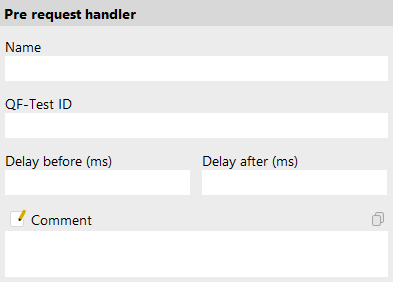
- Name
-
The name of a Pre-request handler is a kind of short description. It is displayed in the tree view, so it should be concise and say something about the function of the handler.
Variable: Yes
Restrictions: None
- QF-Test ID
-
At the moment the QF-Test ID attribute has no meaning for this type of node.
Variable: No
Restrictions: Must not contain any of the characters '\', '#', '$', '@', '&', or '%' or start with an underscore ('_').
- Delay before/after
-
These attributes cause a delay before or after the execution of the node. If a value is empty, the Default delay from the global options is used.
Variable: Yes
Restrictions: Valid number >= 0
- Comment
-
Here you can enter a comment that explains the purpose of this node. This is the preferred way of documenting the test suite.
Note For detailed documentation, especially for Test set, Test case or Procedure nodes, this text area might not be the right place. There are many excellent editors that are much better suited to this task. The option External editor command lets you define an external editor in which comments can be edited conveniently by pressing Alt+Return or by clicking the
button.
You can trigger special behaviors of some nodes using doctags, please see Doctags.
If you enter text in the comment field of a Component node, the node will be considered as 'used' when you want to mark or delete unused components.
Variable: Yes
Restrictions: None
WebAPI44.11.3 Post-request handler
|
Post-request handlers actually get executed during execution of a Web request step. After the request has been sent and the response received, the Post-request handler nodes contained in the parents of the Web request and the Web request itself are collected and executed from least to most specific. The child nodes of these can check response data or make it available via QF-Test variables. See "Structure of WebAPI tests" for further information. |

Contained in: Test set, Test case and Web request nodes
Children: Server script, Comment, Procedure call as well as general control structures.
Execution: When execution is triggered as part of request processing as described above, the child nodes of the handler are executed one by one.
Attributes:
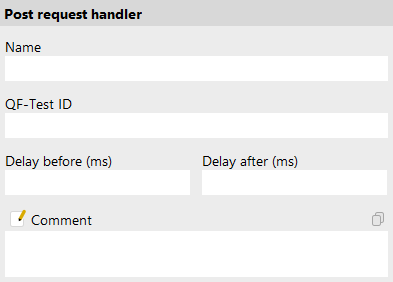
- Name
-
The name of a Pre-request handler is a kind of short description. It is displayed in the tree view, so it should be concise and say something about the function of the handler.
Variable: Yes
Restrictions: None
- QF-Test ID
-
At the moment the QF-Test ID attribute has no meaning for this type of node.
Variable: No
Restrictions: Must not contain any of the characters '\', '#', '$', '@', '&', or '%' or start with an underscore ('_').
- Delay before/after
-
These attributes cause a delay before or after the execution of the node. If a value is empty, the Default delay from the global options is used.
Variable: Yes
Restrictions: Valid number >= 0
- Comment
-
Here you can enter a comment that explains the purpose of this node. This is the preferred way of documenting the test suite.
Note For detailed documentation, especially for Test set, Test case or Procedure nodes, this text area might not be the right place. There are many excellent editors that are much better suited to this task. The option External editor command lets you define an external editor in which comments can be edited conveniently by pressing Alt+Return or by clicking the
button.
You can trigger special behaviors of some nodes using doctags, please see Doctags.
If you enter text in the comment field of a Component node, the node will be considered as 'used' when you want to mark or delete unused components.
Variable: Yes
Restrictions: None
WebAPI44.11.4 Request authentication data
|
This node implements various authentication schemes, currently Bearer, Basic Auth and API Key. When placed below a Pre-request handler, the authentication scheme defined by the node gets applied as part of the execution of the request to which the Pre-request handler belongs. When placed outside a Pre-request handler, the node defines an object variable with the respective authentication settings. Such a variable can be expanded and used later in another Request authentication data. This can be used, for example, to set up authentication in a Dependency for later use in a test. |

Contained in: Pre-request handler for execution, any other place to define a variable
Children: None
Execution: When executed as part of a Pre-request handler the authentication is applied to the current request (see "Structure of WebAPI tests"), otherwise an object variable is set that encapsulates the data.
Attributes:
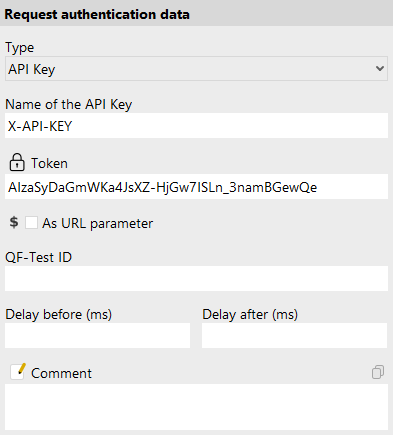
- Type
-
The type of authentication data to define. The attributes Token, Username, Password, Name of the API Key, As URL parameter and Variable containing authentication data depend on this choice. They are described along with the respective type. Possible values are:
- No authentication
- Can be used to turn off authentication defined in some previous Pre-request handler.
- Bearer
- Standard procedure for authentication with a Bearer token. The Token attribute gets placed into a request header named "Authorization" with the prefix "Bearer ".
- Basic Auth
- Standard procedure for Basic Auth authentication based on Username and Password.
- API Key
- Standard procedure for API Key authentication based on the Name of the API Key and a Token. The data either gets placed into a request header or added to the URL as a parameter, depending on the As URL parameter attribute.
- From a variable
- Expands a previously defined object variable specified in Variable containing authentication data containing authentication data and applies that.
Variable: No
Restrictions: None.
- Variable for authentication data
-
The name of the variable to set. The attribute only shows in case the step is placed outside a Pre-request handler.
Variable: Yes
Restrictions: Must not be empty.
- Local variable
-
This flag determines whether to create a local or global variable binding. If unset, the variable is bound in the global variables. If set, the topmost current binding for the variable is replaced with the new value, provided this binding is within the context of the currently executing Procedure, Dependency or Test case node. If no such binding exists, a new binding is created in the currently executing Procedure, Dependency or Test case node or, if there is no such node in the topmost node on the variables stack, falling back to the global bindings if necessary. See "Variables" for a detailed explanation of variable binding and lookup.
In order to predefine the option use Enable 'Local variable' attribute by default.
Variable: No
Restrictions: None
- QF-Test ID
-
At the moment the QF-Test ID attribute has no meaning for this type of node.
Variable: No
Restrictions: Must not contain any of the characters '\', '#', '$', '@', '&', or '%' or start with an underscore ('_').
- Delay before/after
-
These attributes cause a delay before or after the execution of the node. If a value is empty, the Default delay from the global options is used.
Variable: Yes
Restrictions: Valid number >= 0
- Comment
-
Here you can enter a comment that explains the purpose of this node. This is the preferred way of documenting the test suite.
Note For detailed documentation, especially for Test set, Test case or Procedure nodes, this text area might not be the right place. There are many excellent editors that are much better suited to this task. The option External editor command lets you define an external editor in which comments can be edited conveniently by pressing Alt+Return or by clicking the
button.
You can trigger special behaviors of some nodes using doctags, please see Doctags.
If you enter text in the comment field of a Component node, the node will be considered as 'used' when you want to mark or delete unused components.
Variable: Yes
Restrictions: None
WebAPI44.11.5 Request settings
|
This node implements a few settings for web requests which, at technical level, belong to and define the
|

Contained in: Pre-request handler for execution, any other place to define a variable
Children: None
Execution: When executed as part of a Pre-request handler the settings are applied to the current request (see "Structure of WebAPI tests"), otherwise an object variable is set that encapsulates the values.
Attributes:
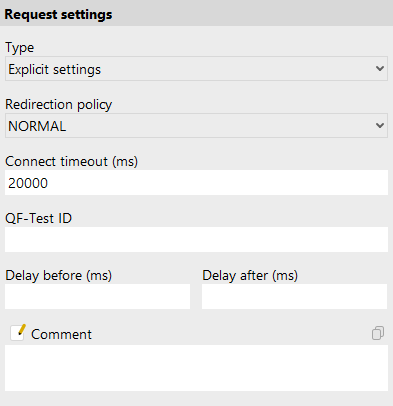
- Type
-
The type of settings to define. The attribute Variable containing settings depends on this choice. It is described along with the respective type. Possible values are:
- No settings
- Can be used to turn off request settings defined in some previous Pre-request handler.
- Explicit settings
-
Define settings for redirect handling and a default timeout for the
HttpClient. - From a variable
- Expands a previously defined object variable specified in Variable containing settings containing request settings and applies those.
Variable: No
Restrictions: None.
- Redirection policy
-
Defines how to handle redirects in the request. Possible values (as defined in the
HttpClient.Redirectenum) are:- NEVER
- Never redirect.
- ALWAYS
- Always redirect.
- NORMAL
- Always redirect, except from HTTPS URLs to HTTP URLs.
Variable: No
Restrictions: None.
- Connect timeout (ms)
-
Defines the default connection timeout to be used if a request does not define its own timeout.
Variable: Yes
Restrictions: Empty or a number.
- Variable for settings
-
The name of the variable to set. The attribut only shows in case the step is placed outside a Pre-request handler.
Variable: Yes
Restrictions: Must not be empty.
- Local variable
-
This flag determines whether to create a local or global variable binding. If unset, the variable is bound in the global variables. If set, the topmost current binding for the variable is replaced with the new value, provided this binding is within the context of the currently executing Procedure, Dependency or Test case node. If no such binding exists, a new binding is created in the currently executing Procedure, Dependency or Test case node or, if there is no such node in the topmost node on the variables stack, falling back to the global bindings if necessary. See "Variables" for a detailed explanation of variable binding and lookup.
In order to predefine the option use Enable 'Local variable' attribute by default.
Variable: No
Restrictions: None
- QF-Test ID
-
At the moment the QF-Test ID attribute has no meaning for this type of node.
Variable: No
Restrictions: Must not contain any of the characters '\', '#', '$', '@', '&', or '%' or start with an underscore ('_').
- Delay before/after
-
These attributes cause a delay before or after the execution of the node. If a value is empty, the Default delay from the global options is used.
Variable: Yes
Restrictions: Valid number >= 0
- Comment
-
Here you can enter a comment that explains the purpose of this node. This is the preferred way of documenting the test suite.
Note For detailed documentation, especially for Test set, Test case or Procedure nodes, this text area might not be the right place. There are many excellent editors that are much better suited to this task. The option External editor command lets you define an external editor in which comments can be edited conveniently by pressing Alt+Return or by clicking the
button.
You can trigger special behaviors of some nodes using doctags, please see Doctags.
If you enter text in the comment field of a Component node, the node will be considered as 'used' when you want to mark or delete unused components.
Variable: Yes
Restrictions: None