
22 WebAPI – Web services testing
WebAPI testing is characterized by generating WebAPI requests and verifying their response and behavior. End-to-end testing scenarios with numerous steps and dependencies is the place where QF-Test shines. This means that unlike other test tools where you can only send an HTTP request and assert the response, QF-Test allows you to implement complex tests where the WebAPI test is just one part of it. This means you can integrate WebAPI testing into end-to-end UI tests and other kinds of automation.
10.0+ Before version 10.0, QF-Test only provided basic functionality for testing simple HTTP flows. Version 10.0 introduces new nodes for handling more complex scenarios, specifically Web request, Pre-request handler and Post-request handler as well as Request authentication data and Request settings. They supersede the existing nodes and significantly enhance the functionality provided for WebAPI testing, i.e.:
- Out-of-the-box support for download, upload, error handling, retry and SSL. Previously this required additional scripting.
- The migration of Postman collections to QF-Test test suites ("Postman migration").
- Generating a QF-Test test suite from an OpenAPI specification ("Importing an OpenAPI Specification").
The implementation is based on the package "java.net.http" from the Java JDK. QF-Test wraps this API into an easy-to-use visual interface, though it does expose underlying objects at script level as well.
Note The WebAPI feature requires a license for QF-Test Web or QF-Test Pro.
22.1 Structure of WebAPI tests
The outer structure of WebAPI tests is no different from UI tests. Test cases are grouped into test
sets, which can be split across test suites, living together in a project. Procedures and dependencies
are just as useful for WebAPI as they are for UI tests.
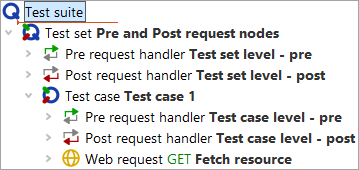
With the Web request node you can configure a WebAPI call via a graphical user interface.
The Pre-request handler and Post-request handler nodes implement a hierarchy of handlers for tuning the request data before the request is sent and for checking the repsonse data - or extracting values from it, once the response is received. Request authentication data and Request settings nodes can be added to a Pre-request handler for visual configuration of authentication and web client settings. The rest is done at script level via Server script nodes.
Pre- and Post-request handlers placed inside a Web request node apply only to that node. Placing them at a higher level will affect all Web request nodes at the lower levels. The flow in both cases is from global to local or outer to inner.
The run log contains everything needed for analysis of the results of a request. Besides the Web request, Pre-request handler and Post-request handler nodes there are dedicated log entries for the web request data actually sent to the server and the response received, both including headers and body.
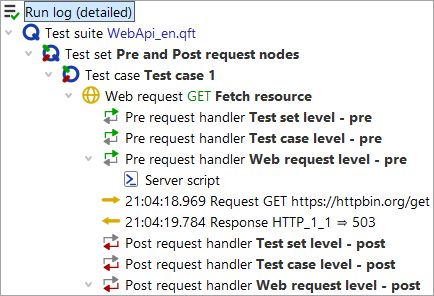
The Server script can make use of the new "WebAPI scripting API" which is available for all scripting languages. We strongly suggest using Groovy because it is more convenient for accessing JSON values than Jython and Groovy interacts more seamlessly with QF-Test than the somewhat limited JavaScript engine "Nashorn" on which QF-Test relies.
Examples are provided in the demo test suite webapi_testing.qft
which can be opened from the menu
»File«-»Bookmarks«-»Sample suites« or via »Help«-»Explore sample test suites...«.
22.2 Request authentication data
Request authentication data can configure and set the authentication to be used with a single or more Web request nodes.
Currently supported (HTTP authentication schemes).
- No authentication
- Bearer
- Basic Auth
- API Key
Please contact support@qfs.de if you authentication scheme is not listed here.
22.2.1 Accept all SSL certificates
QF-Test accepts all SSL certificates. You can enable checking of SSL certificates by setting the option
OPT_WEBREQUEST_TRUST_ALL_SSL to false:
rc.setOption(Options.OPT_WEBREQUEST_TRUST_ALL_SSL, false)
If you have any issues with connecting the the WebAPI you want to test, try to start QF-Test in the following way:
qftest -J-Djdk.internal.httpclient.disableHostnameVerification=true
This is the bug in the JDK which may require QF-Test to be started with this JVM property.
22.3 Request settings
The Request settings step currently supports defining:
- The redirection policy
- A default timeout
Additional settings can be made via a Server script in the Pre-request handler
22.3.1 Cookies
Enable or disable cookies. Default true.
Server script option: OPT_WEBREQUEST_COOKIES.
rc.setOption(Options.OPT_WEBREQUEST_COOKIES, false)
22.3.2 Proxy
Set or override proxy settings. Default none.
Server script option: OPT_WEBREQUEST_PROXY
rc.setOption(OPT_WEBREQUEST_PROXY, "my.company.proxy:8081")
22.3.3 Timeouts and network errors
QF-Test applies a timeout to each Web request node. When no per-step Timeout is set, the global default from Default timeout for web request steps (ms) applies (factory default: 20000 ms).
The Error level if time limit exceeded attribute and the global default option Error level if timeout exceeded in web request step control how timeouts and connection failures are handled. Not all error conditions are governed by this setting:
- Response timeout
- No response was received within the time limit. Handled according to the effective error level.
- Connection timeout
- The TCP connection could not be established within the limit set via Request settings. Handled according to the effective error level, like a response timeout.
- Connection refused
- The server actively rejected the connection. Always throws an exception. This is a hard error not governed by the error level setting.
- Other network errors
- Unknown host, SSL/TLS failures, and other I/O errors. Always throw an exception with a descriptive message.
22.4 Body
This section contains documentation regarding manipulating the body of an HTTP request.
22.4.1 multipart/form-data
Some web APIs may require multipart/form-data for sending a composite body. A typical example consists of a short text input together with a file.
The standard library contains the package qfs.webapi. There you may
find the procedures qfs.webapi.body.multipart.addString and qfs.webapi.body.multipart.addFile.
22.5 End-to-end scenarios – Business application logic
Let's assume you want to create a test case which must assure a proper end-to-end scenario like a business process or a transaction. In this case the setup, cleanup and error handling for the tests should be implemented via Dependencies in QF-Test. For data-driven testing see chapter Data driver in the manual. For the WebAPI request configuration, execution and validation you should use the Pre-request handler and Pre-request handler.
22.6 Single-request API call generator
In this case QF-Test will work as a generator of WebAPI calls. So no complex test case logic is required. Again the Dependency can be used at a top level to ensure overall setup, cleanup and error handling.
Using the mechanism of Pre-request handler and Post-request handler sequences on a global level can ensure global settings and validations.
22.7 Reporting of test runs
Only failed validations are reported in the HTML report of QF-Test.
You can force the logging of successful checks via the "List checks" option in the "Report Generation"
dialog or by using the command line argument "-report-checks".
The automated creation of reports and generation of HTML reports is explained in
"Test execution in batch mode".
22.8 Postman migration
Via the Menu »Extras«-»Convert Postman collection…« a folder or a single Postman collection will be converted into a QF-Test test suite. The collection structure and requests will be transferred to QF-Test. Any JavaScript scripts in Postman are placed in Groovy scripts as placeholders, but you need to re-write them if you still need them. Some additional settings, authentication or metadata may be ignored.
Click the "Convert" button in order to open the file chooser dialog. The conversion process will start immediately after closing the file chooser dialog.
22.9 Importing an OpenAPI Specification
11.0+
QF-Test can generate a test suite directly from an OpenAPI 3.x or Swagger 2.x specification file (JSON or YAML format). The feature reads the API description and creates parameterized Procedures for every HTTP operation, groups them by tag, and - where possible - generates complete CRUD test cases automatically.
The import is available via »Extras«-»Import OpenAPI Specification« .
22.9.1 What is covered from the OpenAPI standard
The importer processes the following elements of an OpenAPI 3.x document:
| OpenAPI element | How it is used |
|---|---|
servers[0].url |
Base URL for all generated requests |
paths + HTTP methods (GET, POST, PUT, PATCH, DELETE, HEAD, OPTIONS) |
One Procedure per operation |
operationId |
Procedure name (falls back to <method>_<path> if absent) |
tags |
Each tag becomes a Package grouping related Procedures |
summary / description |
Inserted as a Comment in the generated Procedure |
Path parameters {param} |
Kept verbatim in the URL; a matching Procedure variable is added |
| Required query parameters | Added as Web request variables, always included in the request |
| Optional query parameters | Declared as Procedure variables; appended to the URI at runtime only when non-empty |
formExplode, pipeDelimited, deepObject
query parameter styles |
Each style is handled with the corresponding pre-request script |
| Request body (JSON, XML, form-encoded) | Generated as a typed payload; top-level fields become Procedure variables |
Schema $ref references |
Resolved automatically - referenced component schemas are expanded in-place wherever they appear in parameters or request/response bodies |
| Response status codes | Set on the Web request; QF-Test auto-verifies the expected code |
Response body (application/json) |
GET/PUT/PATCH Procedures expose the full response as a return value; POST
Procedures expose the primary key field (e.g., id) |
| Security schemes | Injected into each Procedure: API Key, Bearer token, or Basic Auth depending on what the spec declares |
| PathItem-level parameters | Merged with operation-level parameters (operation wins on conflict) |
allOf schemas |
Properties from all sub-schemas are merged and treated as a single object |
readOnly schema properties |
Excluded from all generated request bodies (JSON, XML, form-encoded) |
info.description / info.version |
Added as a comment on the top-level API Package |
tags[].description |
Added as a comment on the corresponding tag Package |
| OpenAPI 3.2.x files | Accepted - the version field is normalized internally before parsing |
| Swagger 2.0 / OpenAPI 2.0 files | Automatically converted to OpenAPI 3.x before import (see "Additional notes and limitations") |
22.9.2 Generated test suite structure
The import creates a .qft file with the following structure:
Packages  "Procedures"
  Package  "<API title>"
    Package  "<tag>"                      one Package per OpenAPI tag
      Procedure  "<operationId>"          one Procedure per HTTP operation
          Parameters   param1 = ""
                       param2 = "example-default"
          Comment      Operation description
                       @param param1  (Required)  integer (int64)
                       @param param2  string, one of: [available, pending, sold]
                       @return        200 OK (Pet {id, name, status})
          Web Request
                  url          https://host/base/{param1}
                  method       GET | POST | PUT | ...
                  statuscode   200 | 201 | 204 | ...
                  variables    required query params
                  payload      {"param2": "$(param2)"}
              Pre-request handler  (when applicable)
                  Request authentication data  security credentials
                  Server script               optional query and body parameters
          Server Script                        rc.returnValue(qw.response.json)

Test set  "<API title>"
  Test case  "<tag>"                      one Test case per tag
      Procedure call -> <operationId 1>
      Procedure call -> <operationId 2>
      ...
  Test case  "<tag> CRUD"                one additional Test case per detected CRUD resource
      Parameters   <pathParam> = ""
                   <bodyFields> = "TestValue"
CREATE -> READ -> verify -> UPDATE -> re-fetch -> verify -> DELETE 22.9.2.1 Request body field parameterization
The importer applies three levels of parameterization to request body fields:
| Level | When | Payload form | Procedure variable? |
|---|---|---|---|
| Top-level fields (depth 1) | Always | $(fieldName) |
Yes - appears in the Procedure's variable list |
| Deeply nested fields (depth >= 2) | Field has a schema value (example or default) | ${default:fieldName:schemaValue} |
No - ${default:x:v} resolves to variable x
if set, otherwise falls back to v |
| Deeply nested fields (depth >= 2) | No schema value available | Literal synthesized value | No |
The ${default:name:fallback} syntax is a QF-Test built-in: the expression
evaluates to the value of variable name at runtime, or to
fallback if the variable is empty or undefined. This means deeply nested
fields remain meaningful out of the box, but can still be overridden by declaring a
variable of the same name on the test case or Procedure call.
22.9.2.2 Procedure comments and @param / @return documentation
Every generated Procedure contains a Comment section with:
- The operation's description text from the spec.
-
One
@paramline per parameter, with(Required)parameters listed first, followed by a type summary: primitive types, enum values (one of: [...]), object field lists ({id, name}), orarray of <itemType>. -
A
@returnline for non-DELETE operations that return a JSON response, combining the response description with a schema type summary (for example,200 OK (Pet {id, name, status})).
22.9.2.3 Security
When the spec defines security schemes, QF-Test inserts a
Request authentication data node inside the Pre-request handler of each
Procedure (API Key, Bearer token, or Basic Auth depending on what the spec declares).
A Comment section at the root of the suite lists which credentials need to be
configured before running the tests.
22.9.3 CRUD test cases
When the importer can identify a Create / Read / Update / Delete operation group for a resource, it generates a self-contained test case that:
- Declares all necessary variables on the test case - the path parameter, any required header parameters, and body fields with representative test values.
- Chains the full CRUD sequence: CREATE (captures the primary key), READ (verifies the created values), UPDATE (modifies values), VERIFY UPDATE (re-fetches and verifies), DELETE (removes the resource). Each phase is introduced by a Comment node for readability.
22.9.4 Before running the generated suite
- Update baseUrl. Often the specs contain a relative path to the server.
- Fill in credentials. Locate the Variable definitions sections near the top of the suite that list the required security variables (API key, username, password, token) and set their values.
-
Check Procedure parameters. Each Procedure has default parameter
values derived from the spec's
examplefields. Override them as needed for your test environment. - Review optional parameters. Variables for optional parameters have a default value from the spec example, or are empty if none is provided. Leave them empty to omit the parameter from the request, or fill them in to include it.
- Run individual Procedures first to confirm connectivity and authentication, then run the generated CRUD test cases for end-to-end coverage.
22.9.5 Additional notes and limitations
-
Swagger 2.0 files are automatically converted to OpenAPI 3.x before
importing using
swagger-codegen-cli.jar. The first time a Swagger 2.0 file is imported, QF-Test downloads this tool and caches it in the user configuration directory. A Java runtime must be available on the system PATH for the conversion to succeed. Use the system propertyqftest.openapi.codegen.outdirto control where converted files are written (default: system temp folder). - XML request bodies are generated, but optional XML body parameters are not yet conditionally injected. JSON and form-encoded bodies are fully supported.
-
oneOf/anyOfschemas produce a payload from the first listed branch. -
Multipart (
multipart/form-data) payloads declare variables but do not generate a fully assembled payload body. - CRUD detection is heuristic; resources without a clear Create + Read + Delete triplet will not have a CRUD test case generated.
22.10 HTTP standards and web services
The web services and websites all use the Hypertext Transfer Protocol. It is a text-based communication made of requests and responses. Here are the most useful and surprisingly short internet standards:
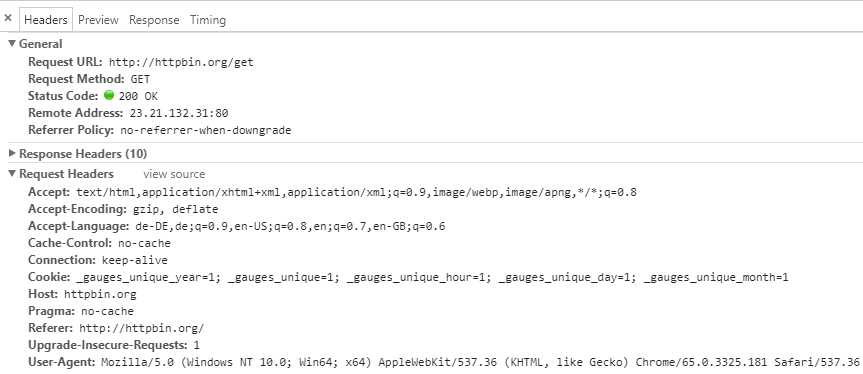
The HTTP request consists of headers, URL and optional payload (body).
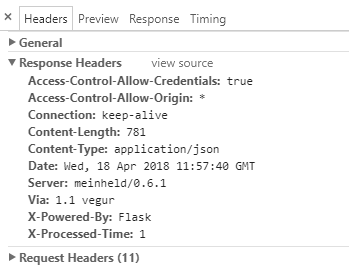
Below graphics visualize the structure of an HTTP GET request and its response. The images are taken from the developer tools of the Chrome browser.
Note
Please be aware a browser's developer tools are not the best means for
analyzing HTTP requests because the browsers will add information or perform additional
actions like signing in again when a session has expired. We recommend to use a special
web API inspector. For details see Web API Inspector.
The response from the server has response code, headers and optional
payload.
22.10.1 Web API Inspector
To follow the network communication we need a Proxy. Install or use the portable option of
mitmproxy.
The demo suite demo/mitmproxy.qft from the QF-Test installation directory contains a dependency
which you can use in your test.
You may start any proxy program and then set a proxy for WebAPI testing via the option
Options.OPT_WEBREQUEST_PROXY.
22.11 The Server HTTP request and Browser HTTP request nodes (legacy)
The Server HTTP request and the Browser HTTP request nodes will still be supported for backwards compatibility. However, for new tests we recommend to use Web request instead.
The node Server HTTP request can be used for sending arbitrary HTTP packets to a host. It supports the HTTP request methods GET, POST, HEAD, PUT, DELETE, TRACE and CONNECT.
With Server HTTP request you must build the HTTP request yourself and verify or validate the responses and/or the results, as well as enter all required data in the respective places, e.g. headers payload, etc. Response handling must be done using the variables set by the server response.
Examples can be found in the example test suite in
demo/webservices
named
webservice_testing.qft.
The examples were built with the help of an HTTP proxy. One such proxy is
mitmproxy.