Business software needs reliablility, not experiments.
Artificial Intelligence – or more exactly: the LLM – is a revolution for software development: never before has it been so easy and fast to produce software. However, LLMs come with a quality problem. They have a loose relationship to reality because they are “only” statistical models. They can generate output, but they cannot take responsibility for it.
This makes software QA more important than ever. We must ensure quality through human oversight while keeping pace with the sheer volume and speed of modern software development.
This is the balance QA must achieve – and it is our mission at QF-Test: to deliver AI integrations that boost the productivity of test automation engineers without compromising or calling into question the quality of their output. QF-Test is designed to build on the expertise of QA professionals, not to replace them.
QF-Test therefore takes a deliberate, transparent approach to Artificial Intelligence, applying it precisely where it delivers real, measurable value in day-to-day testing – without sacrificing QA teams’ control at any stage.
AI features in QF-Test
QF-Test applies Artificial Intelligence wherever it creates real added value in everyday testing – with the goal of making test automation more stable, efficient, and maintainable. The AI-powered features are integrated into key phases of the testing process, providing real relief for QA teams.
With QF-Test 11 and the integrated MCP, QF-Test is ready for agentic AI workflows. In addition to several useful UI improvements, it is now possible to automatically create complex procedure calls directly during recording. In this video, we show you what’s new.
MCP server & MCP toolkit
Control QF-Test directly from your terminal or IDE – and make previously non-AI-capable applications MCP-ready. Our MCP server provides efficient and powerful tools, enabling your AI agent to control and test websites, applications, and apps. This lets you integrate robust UI tests directly into your existing agentic development environment.
AI-powered test case generation at the push of a button
Describe what you want to test – the built-in AI agent examines your application live and delivers a runnable test case draft in minutes, ready for you to continue working on in QF-Test.
Bring your own model
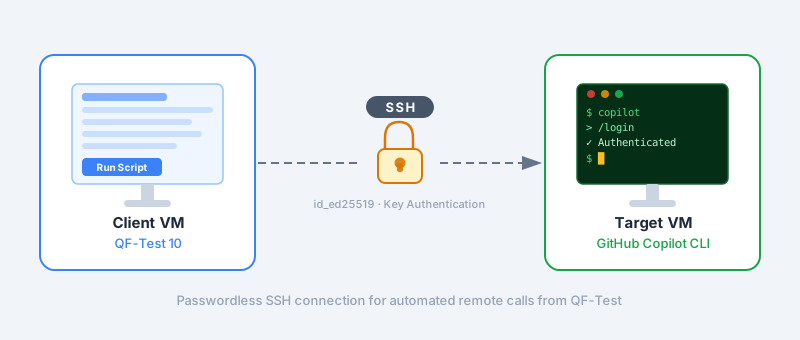
QF-Test allows you to integrate most existing AI providers with just a few clicks. No additional costs and no additional maintenance effort. Popular command-line tools such as Claude Code and GitHub Copilot are compatible – QF-Test sticks to the open “bring your own model” approach and continues to grow.
AI instruction node
Tell the AI in natural language what it should do or check – it executes your instruction dynamically and robustly via the QF-Test connection.
Data table generation
Custom test data at the click of a button: QF-Test generates matching data tables directly in your test project – so you can get started with your own tests faster.
Ask AI during test execution
Thanks to the ai scripting module, you can easily send prompts to any AI configured in QF-Test. Use this to generate test data or perform natural language checks.
Check text with AI
With our fully-integrated “Check text with AI” node, you can validate components in your Applications UI using natural language prompts. This allows you to validate based on “fuzzy” criteria such as language or content.
More coming soon
We’re always working on adding new features to QF-Test. AI is an especially important area for us with lots of potential.
All these features have a common goal: less maintenance, more stable tests, and faster decision-making. See for yourself how AI-driven test automation with QF-Test works in real-world scenarios.
“The new feature ‘Plan & Generate Tests with Agentic AI’ is just massive. With a simple prompt, dozens of meaningful test scenarios are generated that are actually reproduced with relative reliability — that’s a win on every level.”
Irfan Yigit,
CI Developer, ASC Technologies AG, Hösbach, Germany
“Your AI solutions are great — especially the integration of MCP into QF-Test, which is a real win and probably the best choice for the current moment. And last but not least, the automatic test case generation feature is a huge leap forward — simply awesome!”
Irfan Yigit,
CI Developer, ASC Technologies AG, Hösbach, Germany
In this webinar, we’ll show you how QF-Test 11 integrates AI directly into your everyday testing workflow. From AI instructions in individual test steps to automatically generating comprehensive test cases.
Why AI matters in software testing today
Modern software is increasingly complex. Applications consist of numerous components, undergo continuous development, and need to work reliably across multiple platforms. At the same time, frequent changes to the user interface quickly destabilize classic, rule-based tests and drive up maintenance costs. Manual testing is time-consuming and can hardly scale as release frequency increases.
This is exactly where Artificial Intelligence in software testing comes in. QF-Test leverages AI specifically to make tests smarter, more adaptive, and more robust. Application changes can be handled more effectively, test runs become more stable, and feedback is provided faster – an essential advantage for agile teams and modern DevOps processes.
Best practices for AI test automation & AI testing with QF-Test
Successful implementation of AI in test automation requires a thoughtful approach that combines machine learning and proven testing strategies. AI should always be seen as support, not a replacement for QA experts – it complements expertise but does not take over strategic decisions. A gradual rollout with critical test cases lets you evaluate the benefits of AI, gain hands-on experience, and minimize risks. It’s also essential to ensure continuous monitoring and adjustment of AI outputs to guarantee reliability and adapt to changing requirements.
With these best practices, AI-powered test automation becomes a controlled, efficient, and sustainable part of your development process – optimally utilizing AI-driven testing, test intelligence, and autonomous testing in quality assurance.
Although AI can make test automation significantly more efficient and stable, there are important limits to be aware of.
AI is a tool, not a person – it only supports existing processes and cannot substitute QA teams’ planning or expertise.
AI’s view of the world is based on statistics and training data and does not necessarily reflect reality. AIs can and will hallucinate and make stuff up.
Management of false positives and false negatives: AI cannot always automatically classify every anomaly, so human review remains necessary.
QF-Test provides full transparency for all AI-driven decisions through the run log, allowing testers to see exactly how results are determined. This ensures that AI-driven test automation with QF-Test remains reliable, controllable, and practical.
Conclusion – QF-Test makes AI test automation practical
Business software requires reliability, not experiments. With QF-Test, AI test automation is efficient and transparent, used only where it offers real value. The result: fewer error-prone tests, faster feedback loops, and more time to focus on truly value-adding tasks.
Only in three cases, and all of them can be disabled completely. QF-Test does not collect usage statistics or telemetry data.
Case 1 – Update check
Only in the GUI and only with your consent
The update check only takes place in the graphical user interface and only with the user’s consent. It never takes place in batch or daemon mode. You can disable it with the start parameter -noupdatecheck or via the option .
Case 2 – Browser drivers
Download only in WebDriver mode
Browser drivers are only downloaded in WebDriver mode for Chrome and Edge. In the default mode (CDP), no download is required.
Case 3 – AI features
Connection only with a configured language model
AI features only establish a connection if a language model is configured. With a local model, this connection stays within your network as well.
QF-Test does not collect any usage statistics or telemetry data. License checks and the license server don’t communicate with the internet either.
Yes. For Chrome and Edge, QF-Test uses the Chrome DevTools Protocol (CDP) by default, which doesn’t require a separate driver.
Yes. For Chrome and Edge, QF-Test uses the Chrome DevTools Protocol (CDP) by default, which doesn’t require a separate driver. We ship GeckoDriver for Firefox, and Safari comes with its own driver.
Only if you deliberately choose WebDriver mode for Chrome or Edge does QF-Test automatically download chromedriver or msedgedriver. Alternatively, you can store the drivers internally and point to them with the environment variable QFTEST_WEBDRIVERS_ROOT.
Yes, completely possible. There are three independent ways to disable AI features in QF-Test.
Option 1 – Configuration
Don’t add an LLM, don’t enable the MCP server
Don’t create any entry in the “LLM Configurations” table and don’t check the “Enable embedded MCP server” option. Without a configured language model, QF-Test won’t make any AI requests.
Option 2 – System option
Enable the “Block AI features” option
The system option OPT_BLOCK_AI disables all functions that make LLM calls or provide AI interfaces in one go — regardless of any other settings.
Option 3 – Installation
Remove AI libraries
On Windows, AI features can be deselected during installation. On Linux and macOS, simply delete the files lib/langchain4j.jar and lib/mcp.jar from the installation directory.
All three options take permanent effect and can be combined — for example, in environments where a company policy prohibits the use of AI features entirely.
How does the AI agent interact with the SUT? Can I track which actions the AI performs?
The AI agent uses QF-Test’s established component recognition and simulated user actions. All actions performed by the AI are logged by QF-Test.
The AI can interact with the SUT using MCP tools provided by QF-Test. It uses the same component recognition and simulates user interactions in the same way.
When using AI in QF-Test, all actions, MCP tool uses, and responses from the AI agent are documented in the log. This enables full traceability of what the agent did and how it arrived at its results.
Depth limits, accidental data deletion, irreversible actions: How do I restrict AI during autonomous exploration of an SUT for test generation?
AI test generation in QF-Test is designed as a starting point for QA teams — not as a validation tool. This distinction is crucial for proper use.
Autonomous exploration is designed for test environments. Irreversible actions, accidental deletions, or access to systems outside the test environment must be controlled by the test environment itself — not by the AI agent. This applies equally to any AI agent.
Depth limits can be specified in the test description and are generally respected in practice. However, there is currently no mechanism to technically enforce them. The agent can be stopped at any time if undesired behavior is observed during exploration.
How do we prevent the AI from accepting the current application behavior as correct?
AI test generation in QF-Test is designed as a starting point for QA teams — not as a validation tool. This distinction is crucial for proper use.
There is currently no reliable way to prevent the AI from treating the current application state as expected behavior. However, this is not the primary purpose of the feature — it is meant to give QA teams a structured starting point for the test structure, which they then review and refine.
For stable tests, it is recommended to replace the generated AI nodes with traditional QF-Test nodes wherever possible.
What options do I have when prompting for AI test generation?
AI test generation in QF-Test is entirely based on the test description you provide — the more context you supply, the better the results.
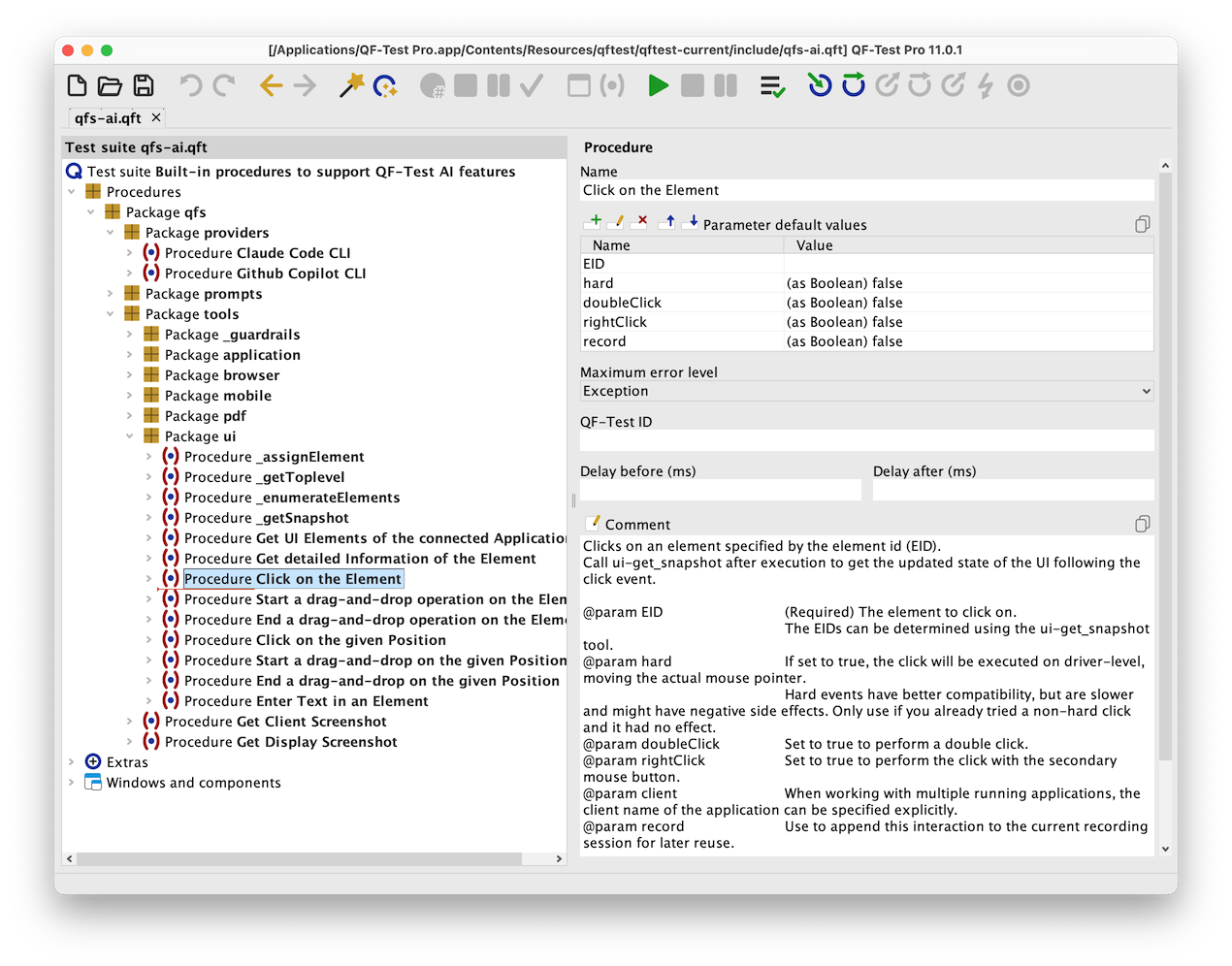
The prompt sent to the AI agent consists of two parts: a base prompt (defined in the library test suite qfs-ai.qft, overridable in your own test suite such as user-ai.qft) and your test description. This description can be as detailed as you like.
You can include tickets and test plans, acceptance criteria, business rules, or references to existing tests in the prompt. As with any AI application, there is no guarantee that all details will be fully taken into account — the more precise and complete your description, the better the result.
Note that overloading the model’s context window can lead to worse results. Keep your descriptions detailed, but focused.
Are AI-generated test suites in QF-Test reproducible?
AI-generated tests vary between runs — that is the nature of non-deterministic AI. However, if the prompt remains constant, the overall structure of the generated tests tends to be similar.
AI test generation in QF-Test is inherently non-deterministic: multiple runs of the same generation process produce different results. This is a fundamental characteristic of large language models.
If the test generation prompt remains the same across all runs, the structure and approach of the generated test suites will generally be similar — even if specific steps or wording differ. Treat each run as a draft to be reviewed and refined by your QA team — not as a finished test package.
 Web Testing
 Java Testing
 Windows Testing
 Mobile App Testing
 AI-driven Testing
 PDF Testing






 Max Melzer

 Monika Dühring