Testing Web applications with QF-Test I UI test automation
In this video, you will learn everything you need to get started with testing web applications with QF-Test.
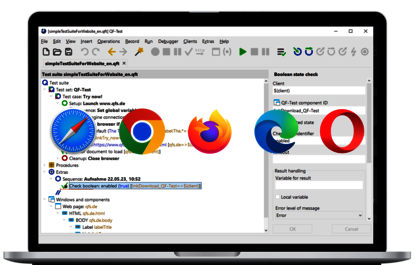
QF-Test provides a powerful, field-proven solution for professional cross browser testing in complex web projects. Software testers and developers can use it to create automated tests for web applications that can be efficiently executed across different browsers, versions, and devices. Once defined, test cases remain maintainable and reusable — a decisive advantage as test coverage grows.
QF-Test is particularly strong in combining functional and cross-browser tests. Test runs can be clearly evaluated per web browser, deviations are documented transparently, and meaningful reports support communication within the team. Thanks to stable object identification and flexible workflows, maintenance effort is significantly reduced, even when the UI changes.
For real-world test projects, this means greater test depth, better browser compatibility testing, and a noticeably improved user experience. QF-Test positions itself as a professional, reliable solution for teams that see cross browser testing not as a mandatory task, but as a true quality factor.
Google Chrome, Mozilla Firefox, Microsoft Edge (including headless mode), as well as Opera and Safari

In this video, you will learn everything you need to get started with testing web applications with QF-Test.

Cross browser testing ensures that a modern website or web application works reliably across different browsers, versions, operating systems, and devices. In practice, this goes far beyond simply checking for a similar visual appearance. The goal is to keep presentation, functionality, performance, usability, and accessibility consistent across browsers—despite different rendering engines, device classes, and technical constraints.
In professional web projects, users access applications using a wide variety of browsers and devices. Even small deviations can cause critical functions to behave unexpectedly. A simple “Looks good in Chrome” is no longer sufficient. Cross browser testing specifically verifies that business-critical core functions such as login, checkout, search, or form workflows work reliably and error-free in all relevant browsers.
For organizations, this directly affects the user experience and ultimately user satisfaction. Errors in specific browsers often remain undetected for a long time, leading to increased support effort, lost revenue, or damage to the company’s reputation. Systematic, reproducible cross-browser testing approaches are therefore an essential part of professional software testing today—especially for complex web applications with high quality requirements.
Cross browser testing refers to the systematic testing of a web application across multiple combinations of browsers, operating systems, and devices. The goal is to validate that an application is displayed correctly and that all intended functions are reliably usable, regardless of the browser being used. This is not about ad hoc testing, but about structured, traceable tests that reflect real-world usage scenarios.

A cross browser test typically covers multiple layers:
The result is a transparent overview of browser-specific deviations and defects, complemented by a clear fix strategy—such as fallbacks, polyfills, or targeted code adjustments. With QF-Test, these results can be captured in a structured way: test runs are documented per browser, deviations are detected automatically, and results are reported in a traceable manner. This creates a reliable basis for ensuring cross-browser quality and avoiding regressions in the long term.

Browsers differ because they are based on different rendering engines and implementations of web standards. Although specifications for HTML, CSS, and JavaScript exist, web browsers implement these standards differently in many details. This affects both visual presentation and the behavior of functions within a web application.
Among the most common causes are different default styles for HTML elements, varying interpretations of modern CSS properties, or differences in JavaScript feature support. New APIs or media features may be available earlier or more reliably in some browsers than in others. In addition, there are varying security and privacy mechanisms, such as how cookies, local storage, or tracking restrictions are handled.

For testers, this means that without targeted cross browser testing, many of these effects remain invisible. Only systematic comparison across multiple browser and device profiles makes it possible to reliably identify and assess real risks to functionality and user experience.

Which browsers and devices should be included in cross browser testing always depends on the actual target audience. The most important starting point is usage data from analytics, support tickets, or market analyses. These show which browsers, operating systems, and devices are actually used by real users.
In practice, a tiered prioritization approach has proven effective. Critical Tier 1 combinations cover the most important browser versions used by the majority of users. Tier 2 includes commonly used older versions or special devices, while Tier 3 represents edge cases and rare configurations.
For many projects, this results in a realistic minimum coverage: current desktop browsers on Windows and macOS, as well as mobile tests on iOS Safari and Android Chrome. QF-Test supports this prioritization by allowing test cases to be reused across browsers and executed selectively in chosen environments — efficiently and transparently for real-world test projects.

Cross browser testing is not a single test type, but consists of several complementary testing approaches. Only the interaction of these approaches ensures that a web application remains stable, usable, and performant across all relevant browsers. Depending on the project phase and risk focus, different priorities can be set.
In general, cross-browser testing activities can be divided into visual, functional, and performance and quality checks. Accessibility is also becoming increasingly important, as assistive technologies behave differently depending on the browser. A structured test strategy combines these aspects and prioritizes them along the most important user paths.
With QF-Test, these test types can be implemented within a single, unified workflow. Consistent test scripts can combine visual and functional checks, while results are clearly evaluated per browser. This allows teams to maintain an overview even as complexity grows and ensure the long-term reliability of their application’s functionality.

Visual cross browser tests verify that the appearance of a web application remains consistent across different browsers. The goal is not pixel perfection, but the correct and usable rendering of all UI components. Even small deviations can negatively impact the user experience or obscure important content.
Typical checkpoints include grid – or flexbox – based layouts, responsive breakpoints, sticky elements, or unwanted overflows. Typographic aspects such as font fallbacks, line breaks, or the rendering of icon fonts and SVGs also play an important role. Recurring UI components such as cards, buttons, forms, navigation elements, or modals must behave as expected in all browsers.
Depending on the target audience, additional requirements such as dark mode or prefers-color-scheme may apply. QF-Test supports visual checks through reproducible test runs in different browsers, allowing deviations to be detected and documented early. This significantly simplifies coordination between development, testing, and design.

Functional cross browser tests ensure that all business-relevant functions of a web application work correctly regardless of the browser used. The focus is on real usage scenarios that are critical to the success of the application. Errors in this area directly affect conversion and user satisfaction.
Among other things, click paths such as navigation, search, filters, or checkout processes are tested. Forms are a particularly sensitive area: validation logic, autocomplete, input masking, and error messages behave differently depending on the browser. Authentication workflows, session handling, and timeouts must also work reliably across browsers.
Other focal points include file uploads, camera or drag-and-drop features, as well as defined error cases such as offline scenarios or slow networks. With QF-Test, these functional tests can be automated across multiple web browsers. Consistent test cases ensure that differences become visible quickly and regressions are reliably detected.

Performance and stability are key quality attributes that can vary significantly depending on the browser and device. Load times, interactivity, and handling of large data volumes differ particularly between desktop and mobile browsers. This is why performance checks are an important component of comprehensive cross browser tests.
In addition to measurable load times, JavaScript errors also play a major role. Some issues occur only in specific browsers and remain undetected without targeted testing. In single-page applications, topics such as memory leaks or unstable long-running sessions also come into play and only become visible after extended use.
QF-Test supports this through repeatable test runs and clean, per-browser result documentation. Issues can be clearly attributed and analyzed in a targeted manner. This ensures that performance is not just evaluated subjectively, but systematically integrated into quality assurance.

Accessibility and cross browser testing are closely linked, as assistive technologies are implemented differently depending on the browser and operating system. An accessible application must therefore not only function correctly, but also be accessible across browsers.
Typical checkpoints when testing accessibility include focus states, keyboard navigation, and screen reader behavior. ARIA attributes and roles are not interpreted identically in every browser. Contrast ratios, zoom features, or text scaling on mobile devices can also vary and affect usability.
Through targeted cross browser tests, these differences can be detected early. QF-Test helps by executing the relevant test cases reproducibly and documenting results cleanly. This makes accessibility an integrated part of quality assurance rather than an afterthought.

In practice, many cross-browser issues occur repeatedly—regardless of framework or project size. They most commonly affect CSS, JavaScript, and the handling of forms or media. Without systematic testing, these deviations often go unnoticed for a long time.
In the CSS area, flex and grid layouts, the behavior of gap, position: sticky, or 100vh on mobile devices lead to differences. JavaScript issues arise from varying API support, different event models, or timing effects in touch and click interactions. Forms also behave differently depending on the browser, for example with input types, autocomplete, or native validation.
Additional issues include media-related topics such as autoplay restrictions, codec support, or privacy mechanisms for cookies and tracking. Even fonts and rendering differ due to subpixel rounding or font smoothing. Cross browser testing makes these issues visible and enables targeted prioritization based on risk and user impact.
Tell us about yourself and we'll connect you with a QF-Test expert who can share more about our product.

Software testing is a key success factor for quality assurance in modern software development. With QF-Test, implementation becomes efficient, flexible, and reliable. The benefits range from high test coverage and fast test execution to comprehensive technology support and easy integration into existing development processes. QF-Test stands out for its stability, usability, and extensibility.
Investing in software testing pays off—especially with a reliable partner like QF-Test.
Whether for automated regression tests, cross-browser tests, or day-to-day quality assurance, QF-Test’s flexible usage options make it a leading tool for professional software testing in organizations of any size.