The system test is an internal test level conducted by the QA team of the developer or manufacturer. The goal is to test the system against the system specification. The acceptance test (User Acceptance Test, UAT), on the other hand, is conducted by the client or future user and tests whether the system meets the business requirements and expectations. The system test takes place before the UAT and is a prerequisite for successful customer acceptance.

Definition: what is a “system test”?
The system test (also called system testing) is a test level in software development where the fully integrated system is tested as a whole against its specified requirements. It follows the integration test and typically serves as the last step before the acceptance test (User Acceptance Test, UAT). In a system test, the software is examined from the perspective of a user or client – without knowledge of the internal implementation. It is a black-box test at the system level. Both functional requirements (e.g., correct processing of inputs, compliance with use cases) and non-functional requirements such as performance, security, reliability, and usability are tested. System tests are a central instrument of quality assurance and form the decisive safeguarding level before release or customer acceptance.

Practical examples of system testing with QF-Test
QF-Test supports testers and developers in efficiently automating system tests – for desktop, web, and mobile applications, seamlessly integrable into CI/CD pipelines.
Practical recommendations:
-
Automate functional system tests: Define test suites in QF-Test that fully cover the most important use cases and user stories of the system and run them automatically after each release. UI testing with QF-Test
-
Regression tests as the backbone of system testing: Use QF-Test to build a stable regression suite at the system level that safeguards the entire core functionality in every build cycle. Regression testing with QF-Test
-
Integrate system tests into CI/CD: Connect your system test suite via QF-Test’s batch mode to Jenkins, GitLab CI, or TeamCity and ensure that no release is delivered without a passed system test. Using QF-Test in CI systems
-
Include non-functional aspects: Supplement functional system tests with load tests and performance measurements to validate the reliability of the overall system under realistic conditions. Test automation with QF-Test
-
Anchor system testing in the test strategy: Clearly position the system test in your overall test strategy – as the decisive level after integration tests and before customer acceptance. Software testing basics

Goals of system testing
The system test pursues several central goals that directly contribute to the quality and release readiness of the software:
- Verification of the overall system against the system specification and defined requirements
- Detection of errors that only emerge when all components and subsystems work together
- Validation of functional requirements such as correct processing, workflows, and error states
- Testing of non-functional requirements such as performance, scalability, security, and usability
- Ensuring release quality as the last test level before the acceptance test or production release
- Creating a documented basis for the acceptance decision by clients or stakeholders
These goals help teams objectively assess the quality of the overall system and minimize release risk.

How does a system test work?
The system test follows a structured process based on the system specification:
- Define the test basis: System requirements, use cases, user stories, and acceptance criteria form the foundation for test case derivation
- Set up the test environment: The test environment should be as close to production as possible – including all interfaces, databases, and surrounding systems
- Derive test cases: Black-box test cases are created from the requirements that test system behavior from the user’s perspective
- Execute the system test: The fully integrated system is tested – functional core paths, edge cases, error states, and non-functional aspects
- Evaluate results: Deviations from expected behavior are documented and prioritized as defects
- Make the release decision: Based on the test results, a decision is made whether the system meets the release criteria for the next step (acceptance test or release)
Since the system test does not require access to the source code, it can be conducted by an independent QA team. In modern projects, it is typically supported by test automation and integrated into CI/CD pipelines.
Interested in QF-Test?
Tell us about your project, and we’ll personally show you how QF-Test can support you.

Conducting system tests
For the operational implementation of system tests, a structured approach is recommended:
Use cases
- Before the acceptance test (UAT) as the final internal quality check
- After the integration test, when all system components have been merged
- For every release candidate to ensure core functionality
- After major system changes as a comprehensive regression test at the system level
Prerequisites
- A fully integrated system that is stably deployed in a test environment
- A clear system specification or documented requirements as the test basis
- Defined test data that reflects realistic usage scenarios
- An agreed entry criterion, e.g., a passed integration test
Step-by-step application
- Define the test strategy: Determine which requirements are in scope and which types of tests (functional, non-functional, regression) should be covered
- Create test cases: Derive concrete, verifiable test cases from the requirements and prioritize by risk and criticality
- Prepare the test environment: Ensure the environment is as close to the production environment as possible and all dependencies are available
- Execute and document tests: Run the tests systematically and document deviations with reproduction steps and screenshots
- Prioritize and track defects: Classify found errors by severity and link them to the affected requirements
- Evaluate test results: Based on the test results and pre-defined exit criteria, determine whether the system is ready for release
Distinction from related test levels
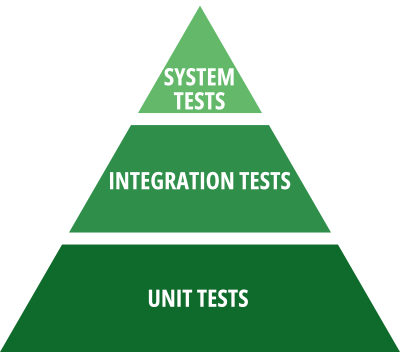
- Unit test: Tests individual functions or classes in isolation; fast, inexpensive, technical
- Integration test: Tests the interaction of modules and interfaces; focuses on component interaction
- System test: Tests the overall system from the user’s perspective against the system requirements; functional and non-functional
- Acceptance test (UAT): Customer acceptance; tests whether the system meets the business requirements and expectations of the client
Combination with other methods
- Smoke tests: A preliminary quick check to see if the overall system is basically operational before the full system test begins
- Regression tests: System tests are reused as a regression suite with each release
- Exploratory testing: Supplements structured system tests with targeted, experience-based checks of new or changed areas

Benefits of system testing
- Holistic quality assessment: The system is evaluated as a whole – not just individual components in isolation
- Early detection of system-wide errors before they appear in production or at the customer’s site
- Independent perspective through the black-box approach: Testers don’t need knowledge of the internal implementation
- Validation of non-functional requirements such as performance, security, and scalability at the system level
- Solid release foundation: Documented test results build confidence among stakeholders and decision-makers
- Reusability as a regression suite in subsequent release cycles

Challenges and solutions in system testing
Late test environment availability: When the system test environment is only available shortly before the planned test start, time pressure arises and test depth suffers. Plan environment setup and test data preparation as independent tasks in the project schedule and define a binding entry criterion for the test start.
Incomplete or contradictory requirements: System tests are only as good as the test basis they are built on. Without clear acceptance criteria, gaps in test coverage arise. Clarify requirements early with the business departments and use techniques such as equivalence class partitioning and boundary value analysis to systematically derive test cases.
Long test run times due to lack of automation: Extensive system tests performed manually take a long time and are error-prone. Automate recurring system test scenarios – especially regression tests – with an appropriate testing tool like QF-Test to reduce run times and increase stability.
Unstable test environment (flaky tests): System tests are sensitive to external factors such as database state, network availability, or configuration deviations. Invest in a stable, dedicated system test environment and ensure a reproducible test data foundation.
Difficult error localization: When a system test fails, it is not always immediately clear which component or service is the cause. Combine system tests with targeted logging and monitoring, and use the test results to forward defects to the responsible teams.
Best practices
- Define clear entry and exit criteria for the system test – e.g., a passed integration test as the entry condition and a defined error rate as the release criterion.
- Systematically derive system test cases from requirements and prioritize by risk and business criticality.
- Automate recurring system test scenarios as a regression suite and integrate them into CI/CD pipelines.
- Use a production-like test environment with realistic test data to achieve meaningful results.
- Conduct system tests independently of the development team to ensure an objective view of the overall system.

Conclusion
The system test is the decisive quality assurance level before release or customer acceptance. As a black-box test at the system level, it tests the fully integrated system against its requirements – functionally and non-functionally, from the user’s perspective. Through consistent automation with QF-Test and integration into CI/CD pipelines, system testing can be made efficient, stable, and reproducible. This way, every release candidate is passed on to the next stage with a solid quality assessment.
Frequently asked questions (FAQ)

What is the difference between a system test and acceptance testing (UAT)?
Both test the overall system – but with different goals and actors.
What is the difference between a system test and acceptance testing (UAT)?
Both test the overall system – but with different goals and actors.

What types of tests are part of a system test?
System tests include both functional and non-functional checks.
What types of tests are part of a system test?
System tests include both functional and non-functional checks.
System tests include functional tests (testing specified functionality based on use cases and user stories), regression tests (ensuring existing functions still work correctly after changes), and non-functional tests such as load tests, performance tests, security tests, and usability tests. The specific selection depends on the requirements and risk profile of the project.

Can system tests be automated with QF-Test?
Yes – QF-Test supports fully automated execution of system tests for desktop, web, and mobile applications.
Can system tests be automated with QF-Test?
Yes – QF-Test supports fully automated execution of system tests for desktop, web, and mobile applications.
With QF-Test, system tests for Java, web, and mobile applications can be fully automated. The test suites can be integrated into CI systems such as Jenkins, GitLab CI, or TeamCity via batch mode and run automatically with every build. This makes system tests a reliable quality gate in the release pipeline – reproducible, low-maintenance, and with detailed reporting.
Interested in QF-Test?
Tell us about your project, and we’ll personally show you how QF-Test can support you.

