Créer des captures d’ecran avec QF-Test
It is relatively easy to take a screenshot of the complete picture with the help of QF-Test. For example, to create a screenshot of the current desktop, only the procedure logScreenshot must be called.
Exemples JIRA avec QF-Test
On a popular demand we have created examples on how QF-Test can be integrated with JIRA.
Audits des sites web automatisés avec Lighthouse et QF-Test
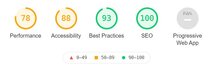
This article shows how to perform automated audits by use of Lighthouse and QF-Test e.g., to measure performance or SEO behavior of your website.
Changer la langue dans QF-Test
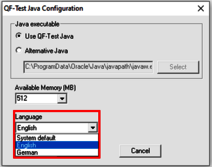
QF-Test exists in German and English. You can switch the language in QF-Test. It is easy you just need to know how to change the language settings.
Enregistrement de la Chrome development console
Loading a web page in the browser and working with it may produce various errors. To log those errors you may use the linked test suite.
Comment utiliser JSON
Especially when testing websites, you are now and then faced with the problem of having to parse JSON (=JavaScript Object Notation) strings. In this blog article, however, the JSON library provided by QF-Test should be described.
Node Transformations in QF-Test
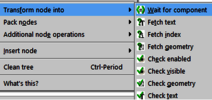
QF-Test it is possible to transform a node into another node type.
The comment node in QF-Test
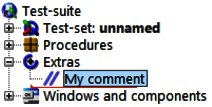
Since QF-Test 5.0.0 a new node was added, here you will learn how to use the comment node.
Comparaison des images dans le monde de Font Antialiasing et ClearType
My images are identical, why do my image checks fail?
Adresser plusieurs fenêtres de navigateur
With multiple opened browser windows, how can I ensure that the correct is used?
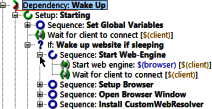
WebSaga | Réveillez-vous!
This is how it starts every night. I barely have a moment of rest until I’m clicked and checked again. But it’s fun, I’m the website www.qftest.com!
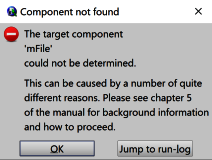
Analyser des ComponentNotFoundExceptions
In case QF-Test is unable to identify the corresponding component in the application a ComponentNotFoundException gets thrown. Whenever an exception occurs QF-Test (by default) logs a screenshot.
WebSaga | Click click – ça chatouille
Now it’s time! Now I can introduce myself to the world. Here I am! Can you see me? Hi! I’m the new website, www.qftest.com!
Les applications Electron fantastiques
A very good solution of the combination of web technology and desktop applications is Electron. Almost every user knows or uses Electron apps. Popular apps like Skype, Microsoft Visual Studio Code or Discord are built using the Electron framework.
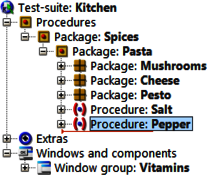
The proof of the pudding is in the eating – Procedures hors de la boîte
Packet soup or baking mixture, cook by yourself or bake? Concerning food opinions divide. Pros and cons. QF-Test doesn’t ship convenience food, you have to cook it yourself. But you will be given a variety of spices that will ease your life: the standard library qfs.qft. From a collection of fine salt and pepper to complex pizza spices, the genuine for every meal.
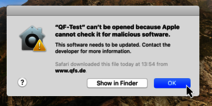
QF-Test 5.0 et macOS Catalina (10.15)
In their recent version of macOS, named “Catalina” (10.15), Apple introduced a feature protecting users from executing malicious software downloaded from the Internet. To separate “good” from “bad” software, Apple implemented a so called “notarization” process, and software which has not been “notarized” cannot be executed on macOS Catalina without further ado.
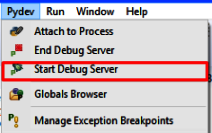
Comment déboger les scripts Jython dans QF-Test?
By the usage of script nodes QF-Test allows embedding of special custom functionality into your test cases. Typically, these scripts are supposed to be short and relatively simple containing just dedicated functionality, whereas the majority of test logic is done via QF-Test visual nodes.
Lire et écrire des fichiers Excel de QF-Test
If you want to use data from an MS Excel file in your QF-Test tests or want to write test results to MS Excel files then go on reading.
Executer des cas de tests avec un tag special
Large test projects may consist out of several thousands of test cases. Often executing them all would need a considerable amount of time, even if multiple machines are used in order to replay the different tests. The solution are tags.
Utiliser QF-Test dans des systèmes Continuous Integration
Les systèmes d’intégration continue (CI-Systems) soutiennent les équipes dans leur travail constant sur les différentes sous-étapes du processus de développement logiciel. L’objectif principal étant l’amélioration de la qualité des logiciels.
Nous utilisons des cookies "Matomo" pour l'évaluation anonyme de votre visite à note page web. Pour cela nous avons besoin de votre consentement qui est valable pour douze mois.
Nous utilisons des cookies fonctionnels pour garantir la fonctionnalité de base du site web.
Nous utilisons Matomo pour analyser et améliorer notre site web. Des cookies permettent une collection anonyme des informations qui nous aident à vous offrir un visite clair et facile à utiliser de nos pages web. Activer les cookies Matomo