
AI26.4.1 Check Text with AI
The Check text with AI node checks the currently displayed text of a target component using an LLM. It is suited for situations where rigid exact comparisons are too inflexible - for example with natural-language messages, varying phrasings, translations, or tolerant matching of multi-line texts.
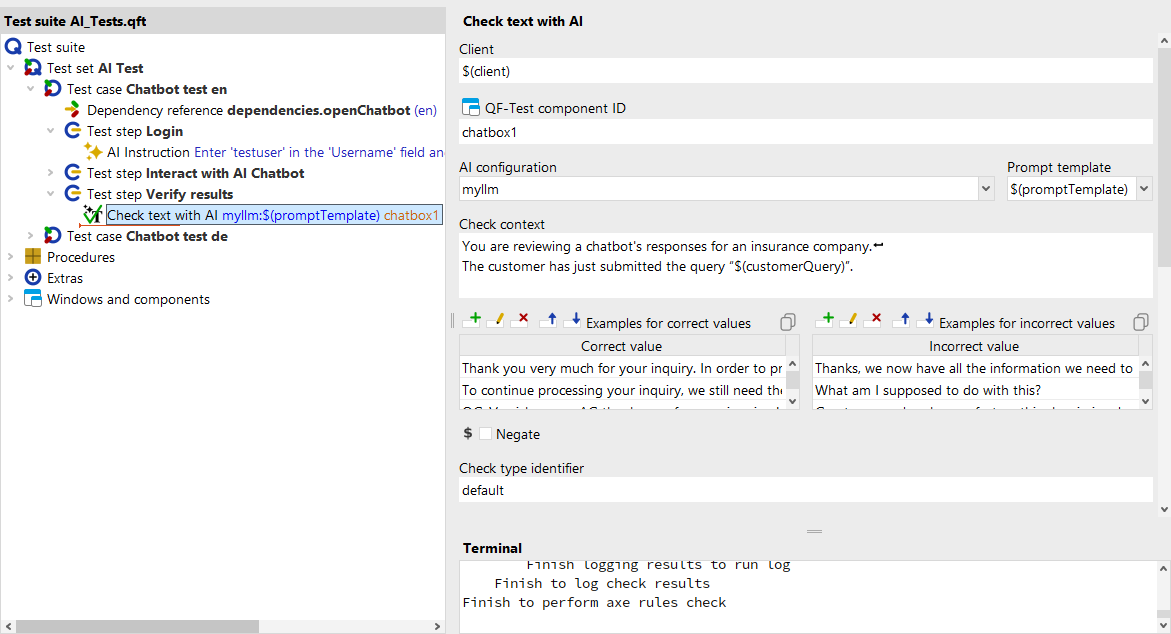
As with a Check string step, QF-Test reads the text from the component. This text is combined with the Check context, the examples from Examples for correct values and Examples for incorrect values, and component metadata, inserted into the chosen Prompt template, and sent to the LLM defined in AI configuration. The model's response determines the outcome of the check; the result and raw response appear in the run log.
Check context, Examples for correct values, and Examples for incorrect values, when provided,
replace the placeholders $(context), $(goodCompletions),
and $(badCompletions) in the Prompt template.
- Check context
- Tells the language model under which criteria it should evaluate the extracted text - for example "Check whether the text contains a friendly greeting" or "Determine whether the error message indicates a network problem." Without this context the LLM lacks an evaluation criterion. (see "Check context")
- Examples for correct values
- Optional list of sample texts that count as correct instances. The examples help the model better assess the expected text style or content, especially with varying phrasings. (see "Examples for correct values")
- Examples for incorrect values
- Optional list of sample texts that count as incorrect instances. Together with Examples for correct values, these negative examples allow the model to make a more precise assessment by drawing clear boundaries between acceptable and rejected texts. (see "Examples for incorrect values")
All further fields and configuration options for the step are described in the reference documentation under Check text with AI.