
AI26.4.2 The AI Instruction Node
The AI Instruction node instructs an AI agent to perform a sequence of actions in the SUT. The instruction is formulated in natural language; the AI model interprets it independently and interacts with the application's user interface using the available QF-Test tools (see "MCP Server"), until the required tasks are complete.
AI Instructions are suited for situations where a rigid sequence of individual steps would be too inflexible - for example with varying interfaces, dynamic content, or flows that differ depending on application state. A single instruction can combine multiple sub-tasks, for example:
- "Enter 'testuser' in the 'Username' field and 'secret' in the 'Password' field, then click 'Sign in'."
- "Check whether the heading 'Welcome' is displayed."
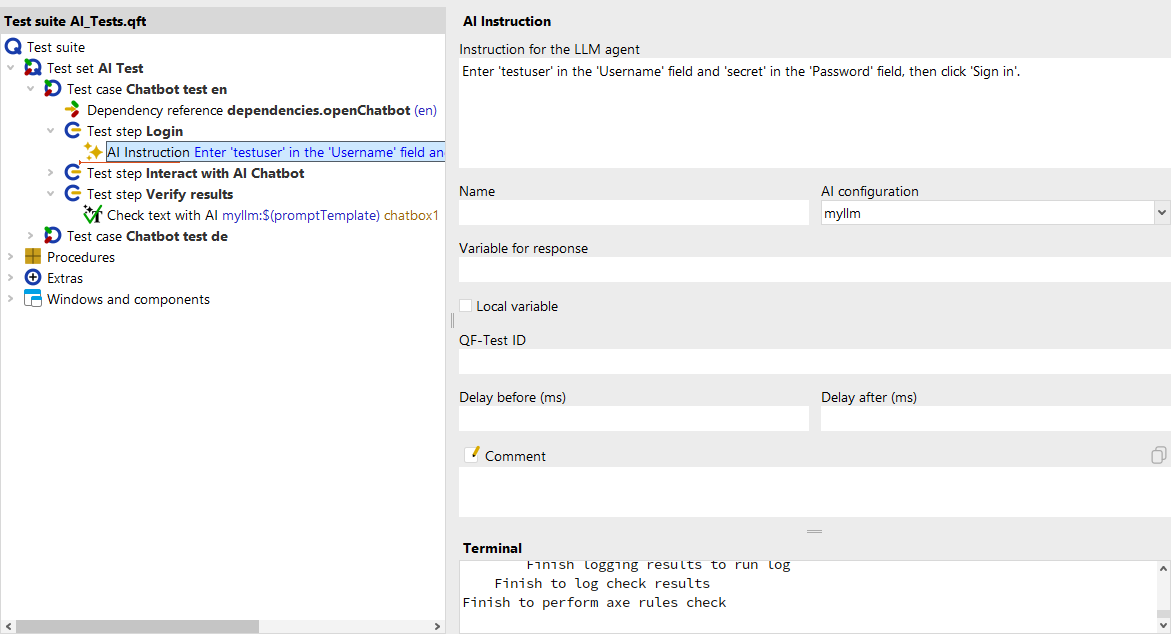
The instruction text is combined with a system prompt that equips the AI agent with knowledge about the SUT client and the available QF-Test tools. The LLM calls the tools autonomously until the tasks are complete. The executed actions can be traced afterwards in the run log.
Note
The system prompt for this step is stored as a procedure ai_instructions
in the file qfs-ai.qft. It can be inspected there via
»File« - »Bookmarks« and overridden
by a procedure with the same name in your own file
(see "Customizing Prompts").
- Instructions
- The natural-language description of the tasks the AI agent should perform in the SUT. An instruction can include multiple sub-tasks. The more precisely it is worded, the more reliable the result. (see "Instructions")
- AI configuration
- The name of the AI configuration to use for execution. The chosen model must support tool calls (tool use), since the agent needs QF-Test tools to interact with the SUT. Without a value, the default configuration (normally the first available configuration) is used. (see "AI configuration")
- Variable for response
- Optional name of a variable into which the AI agent's final response is stored after the step completes. If the field is left empty, the response is discarded. (see "Variable for response")
All further fields and configuration options for the step are described in the reference documentation under AI Instruction.