
AI11+26.3.1 Plan and Generate Tests with AI
QF-Test can automatically plan and generate new tests based on a plain-text description. The generated tests are inserted into the currently open test suite - if no test suite is open, a new one is created automatically. The AI produces a hierarchical structure of Test sets, Test cases, Test steps, and AI Instructions that can subsequently be refined manually or executed directly by an AI agent in QF-Test.
This assistant is useful as a starting point for new test projects and for extending existing test suites: instead of creating tests from scratch, the AI provides an initial sensible outline that you can then expand and customize as needed.
Note A simple way to convert AI Instructions into non-AI-based QF-Test nodes is to enable "Recording sequences" while executing an AI Instruction.
26.3.1.1 Prerequisites
At least one AI model must be configured in QF-Test for AI-assisted generation. Configuration is done in the options dialog under »Artificial Intelligence«. If no model is set up yet, opening the generator shows an information dialog with the button Open AI Settings that takes you directly to the configuration.
26.3.1.2 Opening the Dialog
Open the generator via the corresponding  toolbar button, located directly next to the Quick-start Wizard button.
26.3.1.3 Dialog Fields
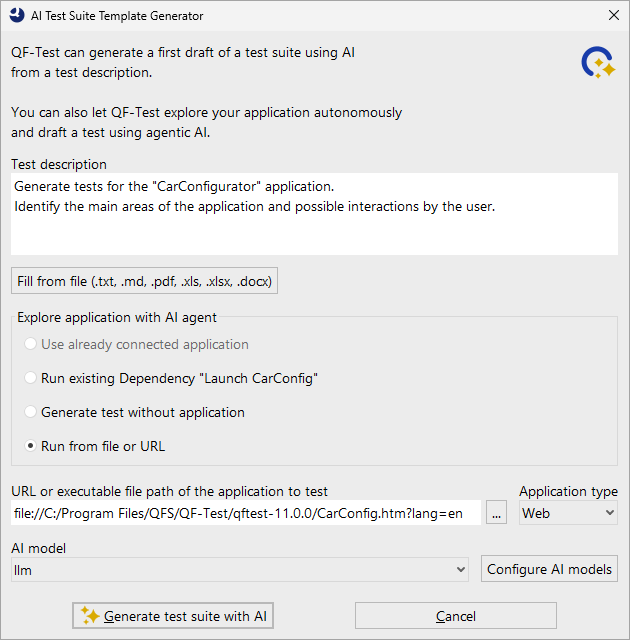
- Test description
-
Enter a plain-language description of the functionality to be tested here. Describe the workflows or scenarios to be covered - for example login flows, form inputs, navigation paths, or business processes.
Alternatively, use the Fill from file button to load the contents of a file directly into the text field. Supported formats are:
.txt,.md,.pdf,.xls,.xlsx, and.docx. - Explore application with AI agent
-
This option group determines whether and how the AI explores the application under test before generating the test suite. Choose one of the following options:
- Use connected application
- If an application is already connected to QF-Test, the AI can use it directly for exploration. The option displays the name of the connected application.
- Run existing Dependency
- If the current test suite already contains a dependency for launching an application, it can be executed. The option displays the name of the dependency.
- Generate test without application
- The AI does not explore an application and generates the test solely based on the test description.
- Run from file or URL
- Enter the URL of a web application or the path to an executable file. QF-Test automatically creates a corresponding dependency in the test suite and launches the application for exploration.
Note AI-assisted exploration may take several minutes depending on the application and the AI model used.
- AI model
- Select the AI model to use for generation. The available entries correspond to the models configured in the QF-Test options. Use the Configure AI models button to go directly to the settings.
26.3.1.4 Starting Generation
Click Generate test suite with AI to start the process. Progress is shown in the QF-Test status bar. The duration depends on the length of the description and the model chosen, and can range from a few seconds to several minutes. You can cancel the process at any time by clicking the Stop button in the toolbar.
Every planning and generation run creates a run log in which all steps taken by the agentic AI are comprehensively documented. The log can be reviewed in the run log window after completion.
After successful generation a confirmation appears and the generated test structure is displayed directly in the open test suite. If generation fails, for example because the model is unreachable or the time limit is exceeded, an error dialog appears with a corresponding message.
26.3.1.5 Generated Test Structure
The result of AI generation is a hierarchical structure in the test suite:
- Test sets group thematically related tests together.
- Test cases within Test sets represent individual test scenarios.
- Test steps divide each Test case into logical sections.
- AI Instructions within Test steps contain the individual natural-language instructions for the AI agent.
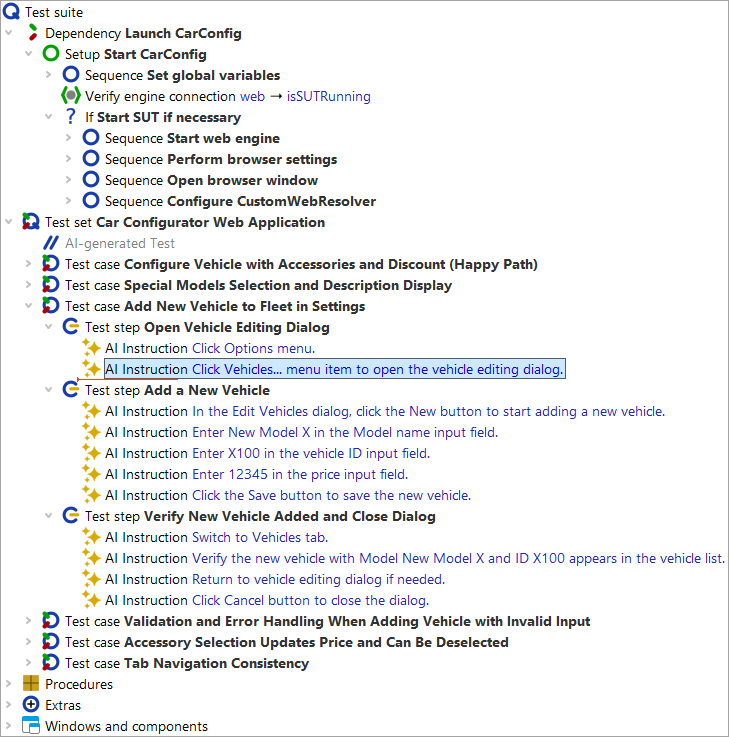
Each Test set contains a comment with the tag @ai_generated,
the name of the AI model used, and the original prompt used for generation.
Note The generated AI Instructions are designed for execution by an AI agent. For full automation without an AI agent, the AI Instructions must be replaced with concrete QF-Test test steps.
26.3.1.6 Customizing Prompts
The system prompt for test suite generation is stored as a procedure
generate_suite in the file qfs-ai.qft.
The procedure for AI-assisted exploration of an application (checkbox
Generate a test plan with AI by exploring the application) is called
plan_tests and is also found there. The file can be opened via
»File« - »Bookmarks«.
To customize a prompt without modifying the shipped file, create a procedure
with the same name in your own file (e.g. user-ai.qft) and list
that file higher in the "Test suite files for MCP tools and prompts" table than
qfs-ai.qft. QF-Test will then prefer your version of the prompt.