
AI26.3.2 Generate Data with AI
In tables that support this feature - currently in Data tables - there is a
 Generate data with AI button alongside
the usual row and column editing buttons. This lets you fill the table automatically
with test data using a Large Language Model (LLM).
Generate data with AI button alongside
the usual row and column editing buttons. This lets you fill the table automatically
with test data using a Large Language Model (LLM).
The button is only active when at least one LLM configuration is entered under »Settings« - »Artificial Intelligence« and AI features in QF-Test are not blocked.
Clicking the button opens a dialog with a text field where you enter an instruction for the LLM in natural language. Be as specific as possible about what kind of data should be generated, for example "Generate 20 fictional customer records with German names, street addresses, and postal codes" or "Create ten login credentials with realistic-looking usernames and passwords of varying length." After confirming, QF-Test sends the request in the background to the default AI configuration (if not otherwise defined, the first one).
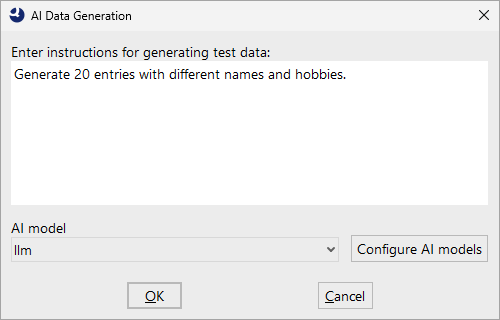
The following is passed to the LLM:
- the names of the columns already defined in the table,
- the current table contents as context, so that the LLM can continue the existing data style and adopt the column structure,
- your entered instruction,
- and a technical specification of the expected response format, so that the result can be automatically inserted into the table.
The LLM response is evaluated, converted into the table format, and then replaces the existing table contents. If the request fails - for example because the LLM is unreachable, authentication fails, the connection timeout is exceeded, or the response cannot be evaluated - an error message is displayed and the table remains unchanged.
26.3.2.1 Limitations
- Columns must be defined before generation.
- The table columns must be defined before calling the function. As long as no columns exist, QF-Test cannot tell the LLM which fields to generate, and displays a corresponding message.
- Generation duration is model-dependent.
- The generation duration depends on the LLM used. Depending on the provider, model size, network connection, and complexity of your instruction, the time needed for a response increases. The connection to the LLM provider is bounded by the "Connection timeout for LLM requests (ms)" option.
- Existing table contents remain unchanged.
- Existing table contents are not modified by data generation. Therefore, the data generator cannot be used directly to, for example, fill a newly added column or fill gaps in existing data.
- The quality of the generated data is not guaranteed.
- LLM responses are non-deterministic and can vary from call to call. Check the generated data for content and syntactic correctness before using it productively in your tests.