

Test management tool integration with QF-Test

On this page

Test automation and test management go hand in hand – but rarely come from a single source. QF-Test integrates seamlessly with leading test management tools and automatically writes back test results. Your existing processes stay intact, and your test results become visible.

Coming soon

Get X-Ray vision: Integrate QF-Test results with Xray and Q12-TMT

On Monday, May 18, 2026, 3:30 PM – 4:30 PM CEST, in English

Xray Test Management and Q12-TMT are popular test management tools. Thats why we will use this special webinar to show you how you can use the latest features in QF-Test to synchonise your test results with Xray and Q12-TMT. This way, you can combine the detailed test reports from QF-Test with the strengths of these tools.

Why test automation and test management belong together

In many QA teams, test automation and test management run in parallel but separately: scripts in one tool, test cases and requirements in another. This wastes time, creates data silos, and turns traceability into manual work.

QF-Test closes this gap. Using batch mode or daemon mode, test results are transferred directly and automatically to your test management system – with no manual effort and no information loss. The result is continuous quality assurance: from requirement to test case to test result.

QF-Test and Q12-TMT: The complete QA toolchain from a single source

Q12-TMT – The test management tool by the mgm group
One vendor. Two tools. One complete QA toolchain.

QF-Test and Q12-TMT are both part of the same corporate group: mgm technology partners. Both tools are designed to work together and form a seamless QA workflow – from risk-based test planning to automated execution.

Q12-TMT is the professional test management tool for scalable, risk-based quality assurance in enterprise projects. With a unique multi-level approach to risk-based testing – visualized through a dynamic heat map – it focuses resources on the most critical areas of your software.

  • Q12-TMT plans, prioritizes, and documents test cases based on risk
  • QF-Test automates test execution for web, desktop, Java, and mobile applications
  • Test results flow automatically from QF-Test back to Q12-TMT
  • Full traceability from requirement to test result
  • No vendor switching. No toolchain gaps. One shared support.

Supported test management tools

QF-Test already provides ready-made integration solutions for the following established test management systems:

How the integration works

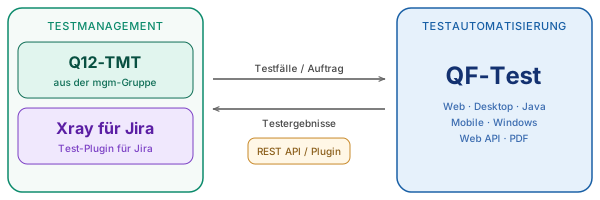
Integration between test management tool and QF-Test

Batch mode and daemon mode

Regardless of the test management tool in use, every connection to QF-Test is based on the same proven principle: the test management system triggers test execution, QF-Test runs the tests, and automatically sends back results, logs, and status messages.

The integration is done via batch mode or daemon mode:

  • Batch mode – Simple, direct test execution via command line. Quick integration, no persistent process required.
  • Daemon mode – A persistent QF-Test process accessible via API. Ideal for parallel execution, remote operation, and flexible control.

This approach is flexible, tool-agnostic, and integrates seamlessly into existing CI/CD pipelines.

Key benefits

Automatic result transfer
Test results are written back to your test management system directly and without manual effort.
Complete traceability
From requirement to test case to test result – everything traceable in one system.
No tool switching
QF-Test complements your existing test management system without replacing it.
Flexible integration
Via batch or daemon mode, QF-Test can be integrated into virtually any environment and CI/CD pipeline.
QA from a single source
With Q12-TMT and QF-Test, you get a fully integrated QA toolchain from the mgm group.

Your test management tool isn’t on the list?

QF-Test can generally be connected to any test management system via standardized interfaces. Contact our support team – we’ll be happy to advise you on options for a custom integration.

Frequently asked questions about test management integration

FAQs about test management integration

Which test management tools does QF-Test currently support?

QF-Test provides ready-made integration solutions for five established systems.

QF-Test currently supports OpenText Quality Center (formerly Micro Quality Center and HP ALM), Imbus TestBench, QMetry, and TestLink. Q12-TMT and Xray for Jira are coming soon. For a complete overview, see the documentation.

How are test results transferred?

Transfer happens automatically via batch or daemon mode.

The test management system calls QF-Test, QF-Test runs the tests, and automatically writes back results, logs, and status information. Learn more in the test execution chapter.

What is the advantage of the Q12-TMT integration?

Q12-TMT and QF-Test come from the same corporate group.

Q12-TMT and QF-Test are both products of mgm technology partners GmbH. The combination provides a fully integrated QA toolchain: risk-based test planning in Q12-TMT, automated test execution in QF-Test, automatic result feedback – from a single source, with shared support. Learn more about Q12-TMT.

My test management tool isn’t on the list – what now?

No problem – QF-Test is open to custom integrations.

QF-Test can be connected to virtually any system via open interfaces (batch mode, daemon API, REST). Our support team is happy to help: Contact support.

Related topics

Interested in QF-Test?

Tell us about yourself and we'll connect you with a QF-Test expert who can share more about our product.

We use "Matomo" cookies to anonymously evaluate your visit to our website. For this we need your consent, which is valid for twelve months.

Cookie Configuration

Functional cookies

We use functional cookies to ensure the basic functionality of the website.

Performance and statistics cookies

We use Matomo for analyzing and optimizing our website. Cookies permit an anonymous collection of information that help us offering you a clear and user-friendly visit of our web pages.

Cookie details
Description Vendor Lifetime Type Purpose
_pk_id Matomo 13 Months HTTP Contains a unique, pseudonymized visitor ID internal to Matomo for recognizing returning visitors.
_pk_ref Matomo 6 Months HTTP Used to track from which website the anonymized user proceeded to our website.
_pk_ses Matomo 1 Day HTTP The Matomo session cookie is used to track the visitor's page requests during the session.
_pk_testcookie Matomo Session HTTP Used to check whether the visitor's browser supports cookies.
_pk_cvar Matomo 30 Minutes HTTP Temporarily store data about the visit.
_pk_hsr Matomo 30 Minutes HTTP Temporarily store data about the visit.